
SOX Audit Trail: Everything Evidenced, Everything Checkable.
From the moment an exception is found to the moment it is remediated, and every change made along the way, SOXLayer keeps a record built to hand over and verify.
DEMO VIDEO
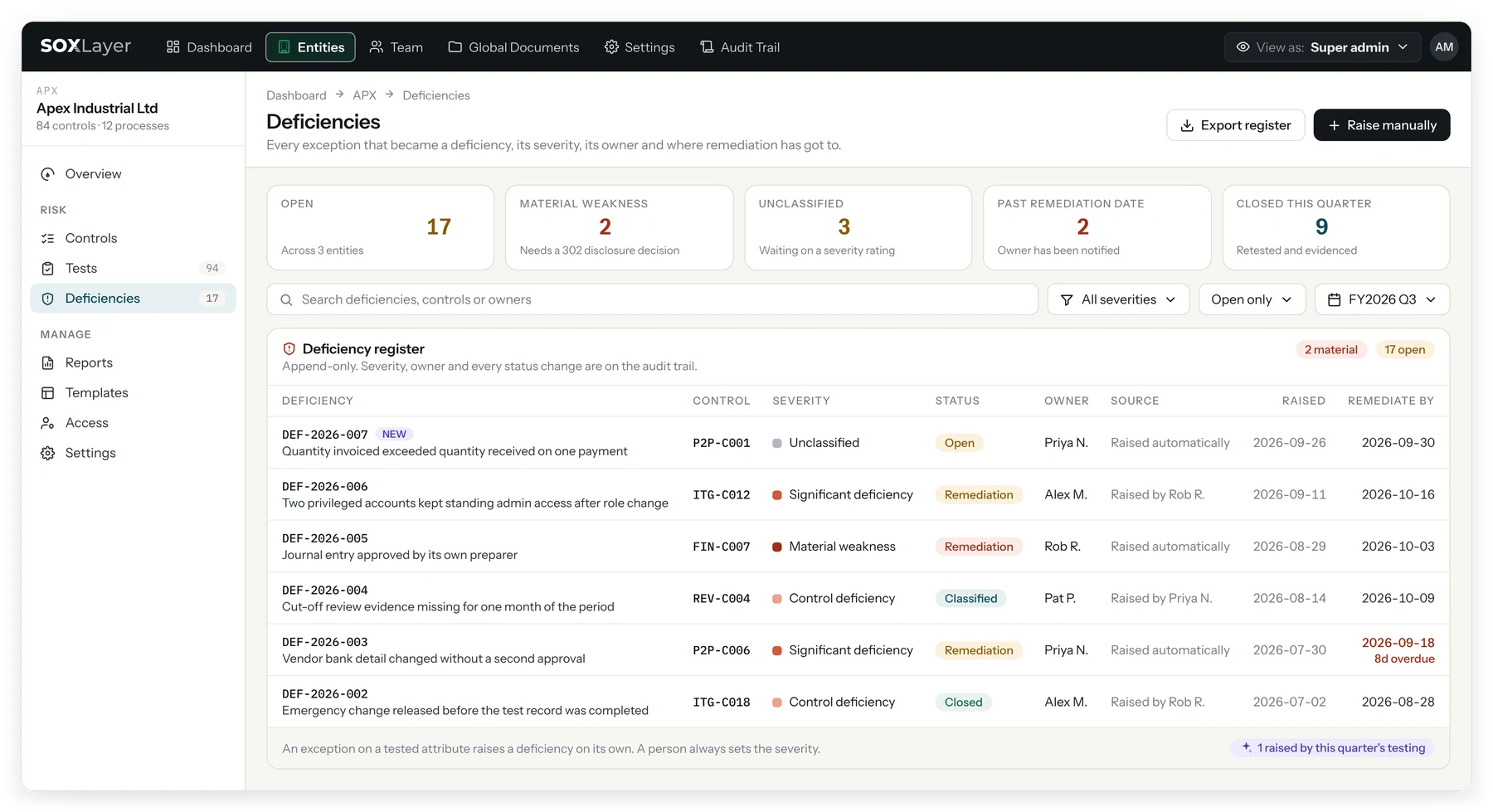
Follow a deficiency from the first exception to the auditor package.
A 42-second demo of SOX audit trail and deficiency management in SOXLayer: the hash-chained audit trail, the deficiency register, an exception raising a deficiency and moving to remediation, the chain verified, the year's deficiency register and the auditor package.
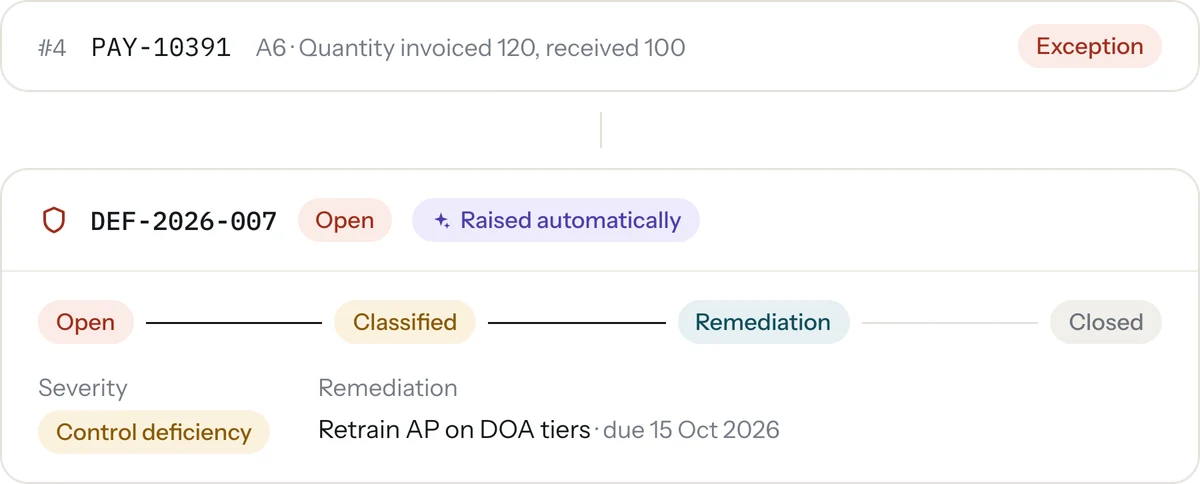
DEFICIENCY LIFECYCLE
From exception to closed, with nothing skipped.
A sample marked as an exception raises a deficiency automatically, linked back to the test and the samples behind it. Severity, root cause, remediation items with due dates and a retest all live on the same record.
Open, Classified, Remediation, Awaiting retest, Closed.
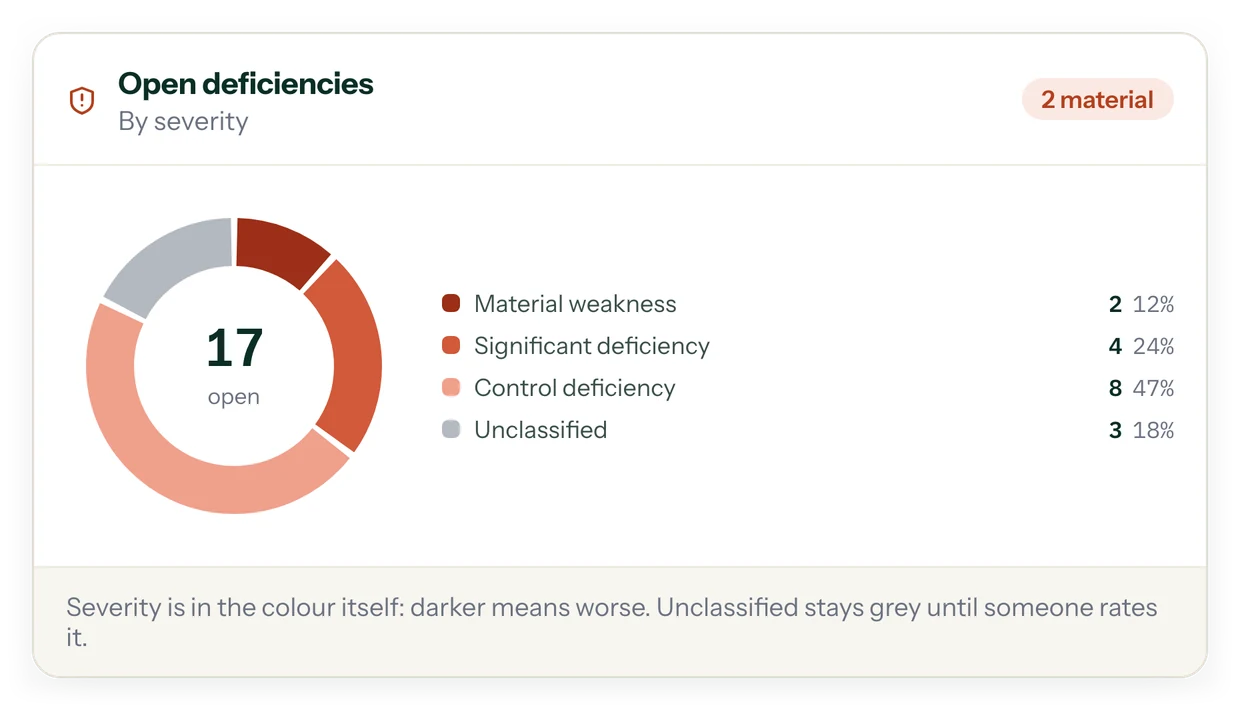
- Severity classified as a control deficiency, significant deficiency or material weakness
- Root cause and remediation items with owners and due dates
- Closed only after a retest confirms the control is working
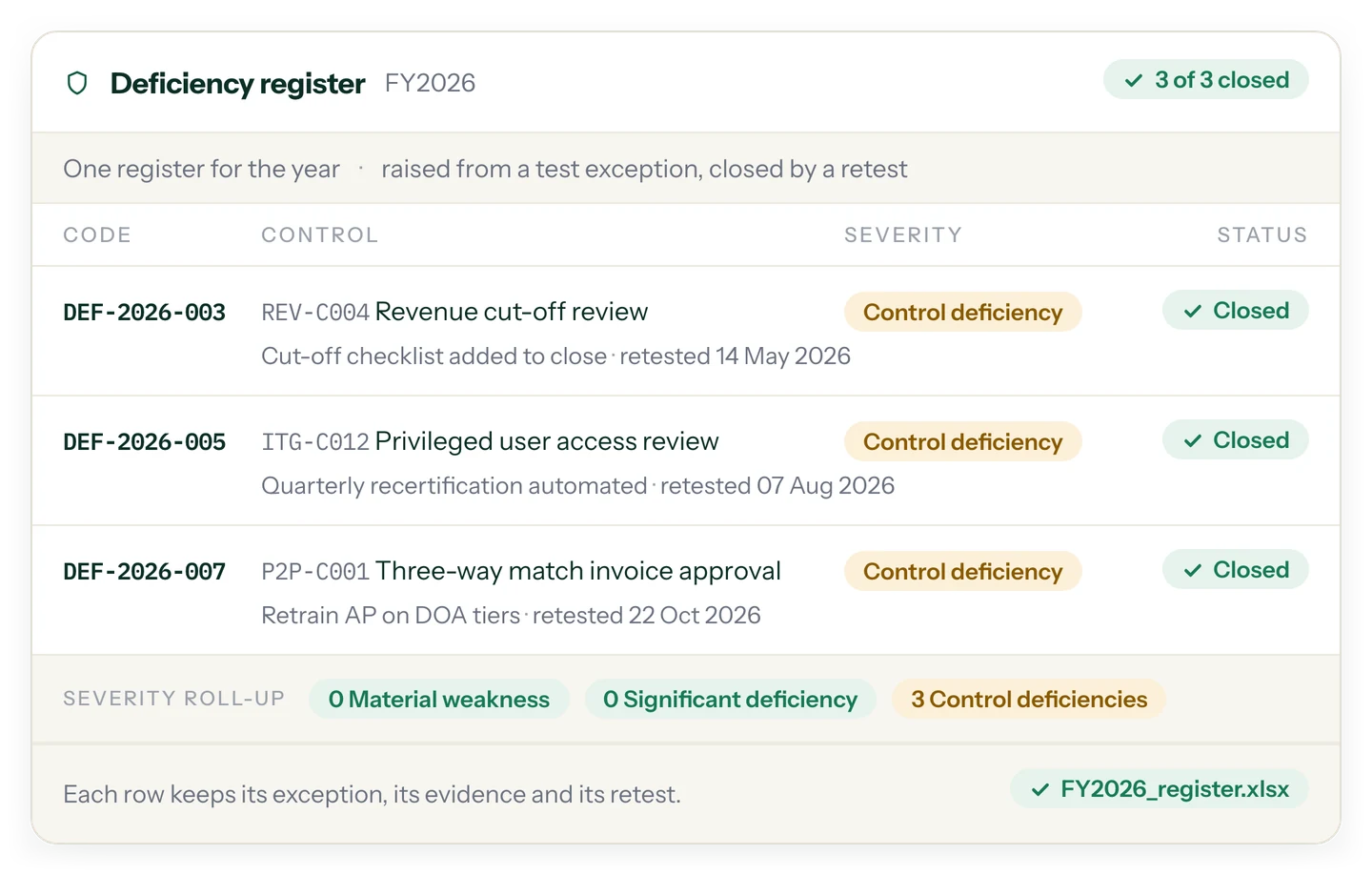
One register for the year. Each row keeps its exception, its evidence and its retest.
Every deficiency is raised from a test exception and closed by a retest, with a severity roll-up across control deficiencies, significant deficiencies and material weaknesses. Export the register as a spreadsheet when someone asks for it.
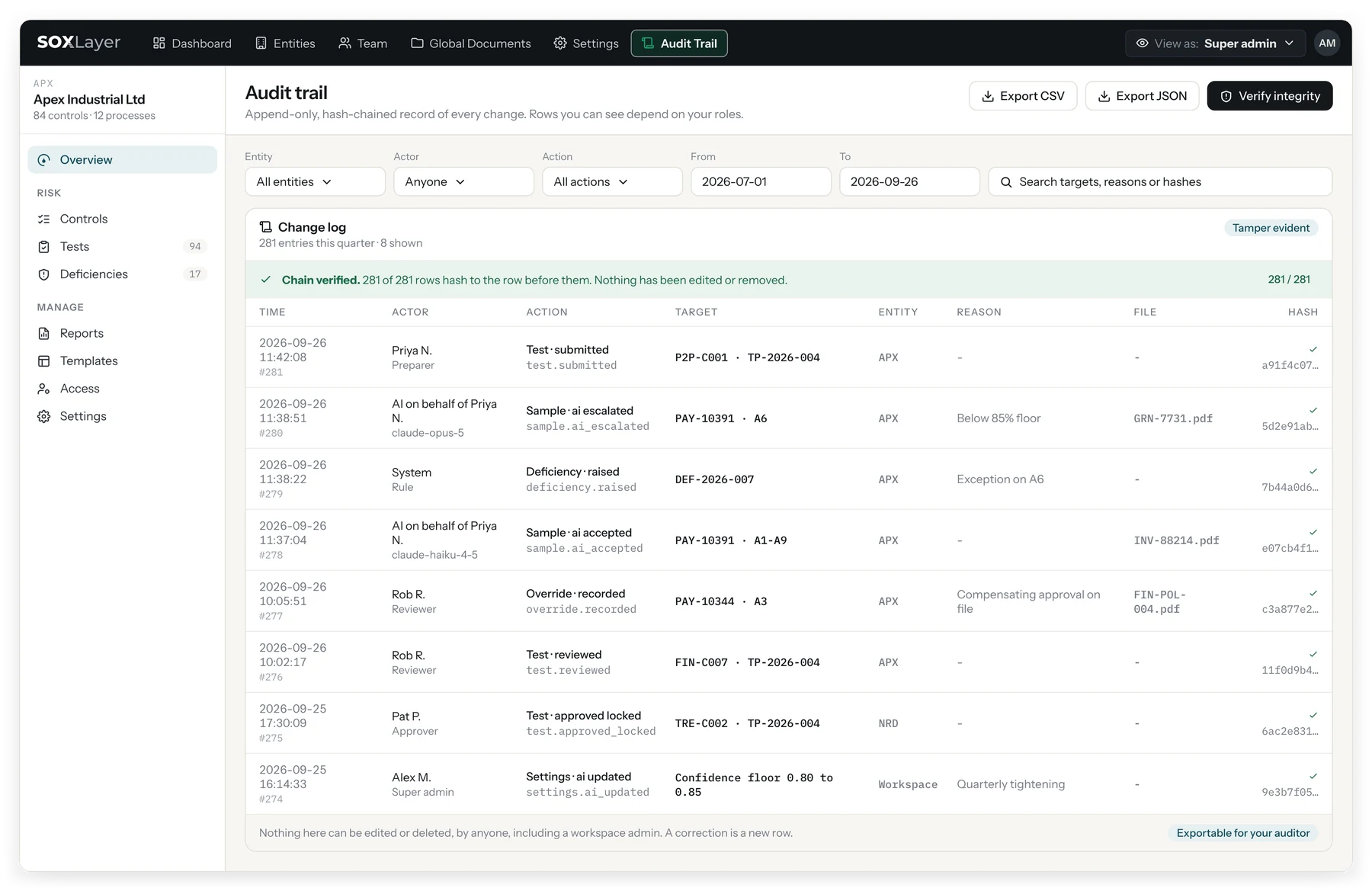
AUDIT LOG
Append-only, hash-chained, and verifiable in one click.
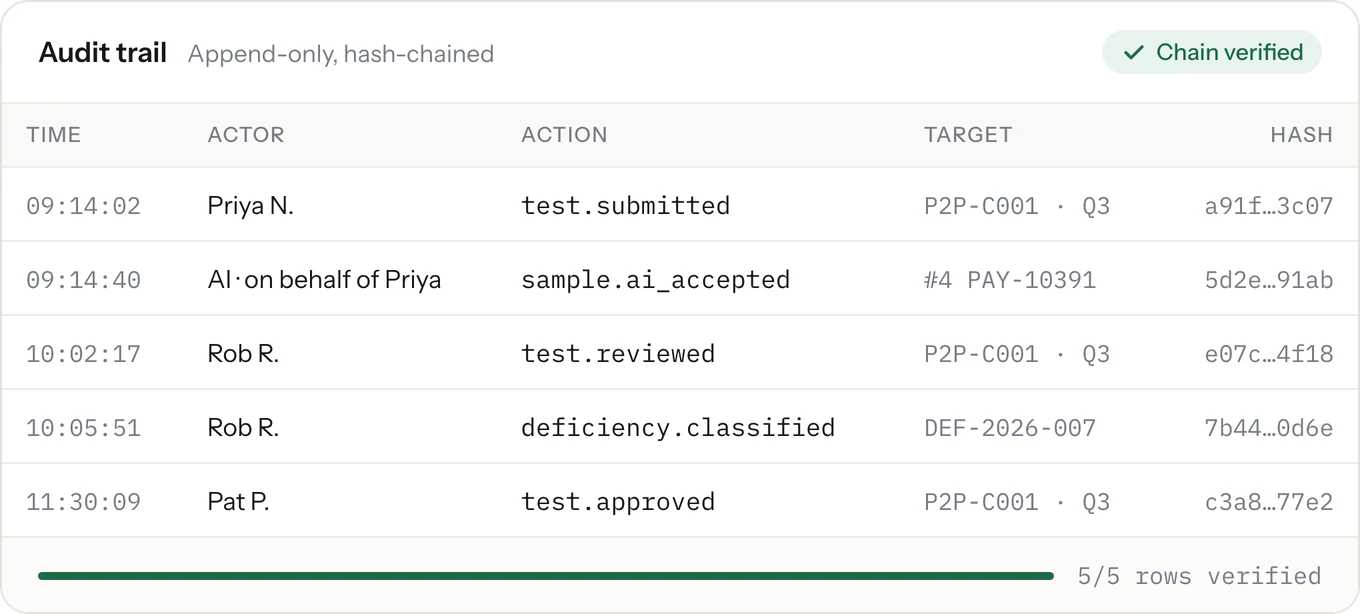
Every change is written to a log that can only grow. Each row carries the hash of the one before it, so if someone edited row 120 next March, every row after it would stop matching and "Verify integrity" would fail.
Who, what, when, before, after, and why.
- The reason for the change is recorded alongside it
- Filter by entity, actor, action and date
- Export as CSV or JSON
- "Verify integrity" checks the hash chain in one click
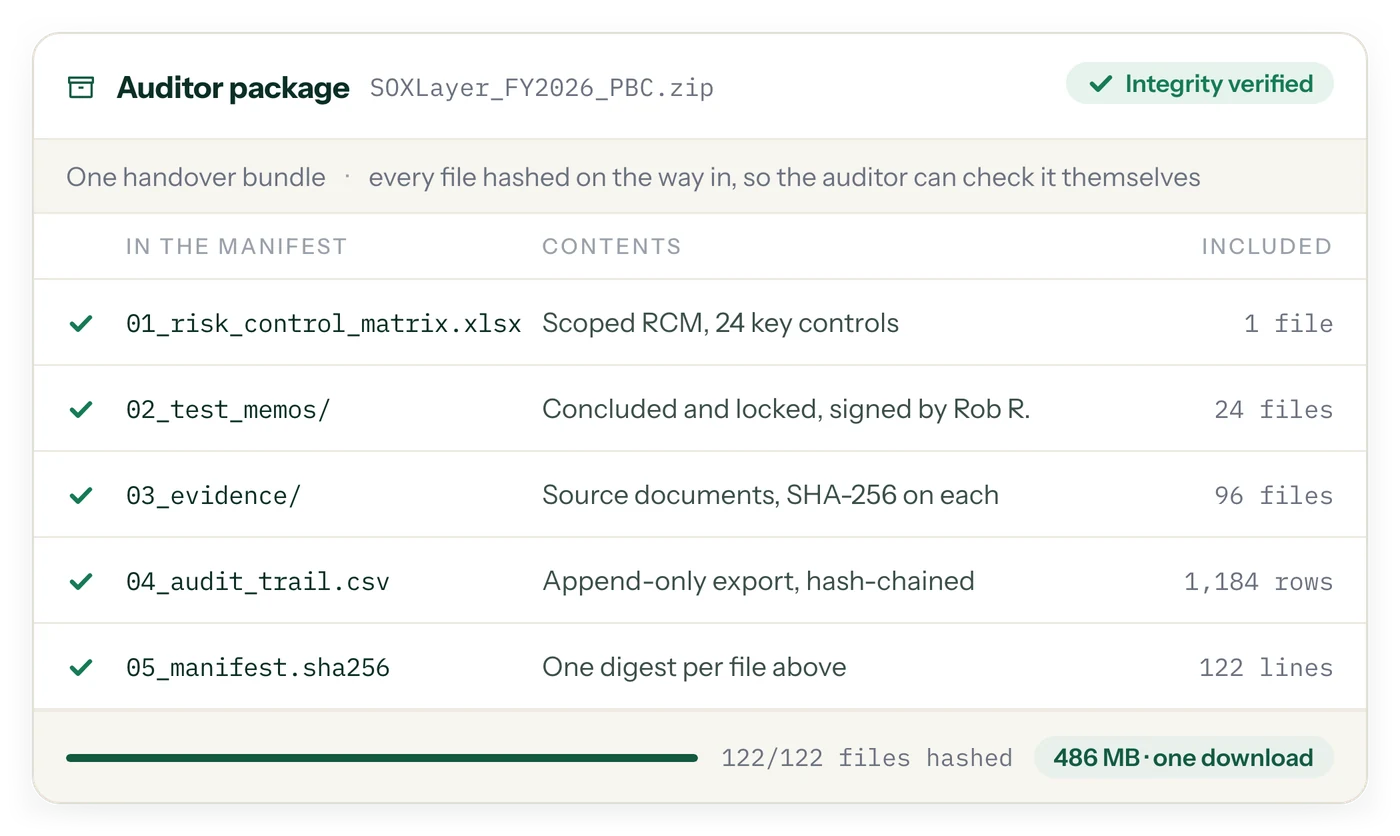
One handover bundle, every file hashed on the way in.
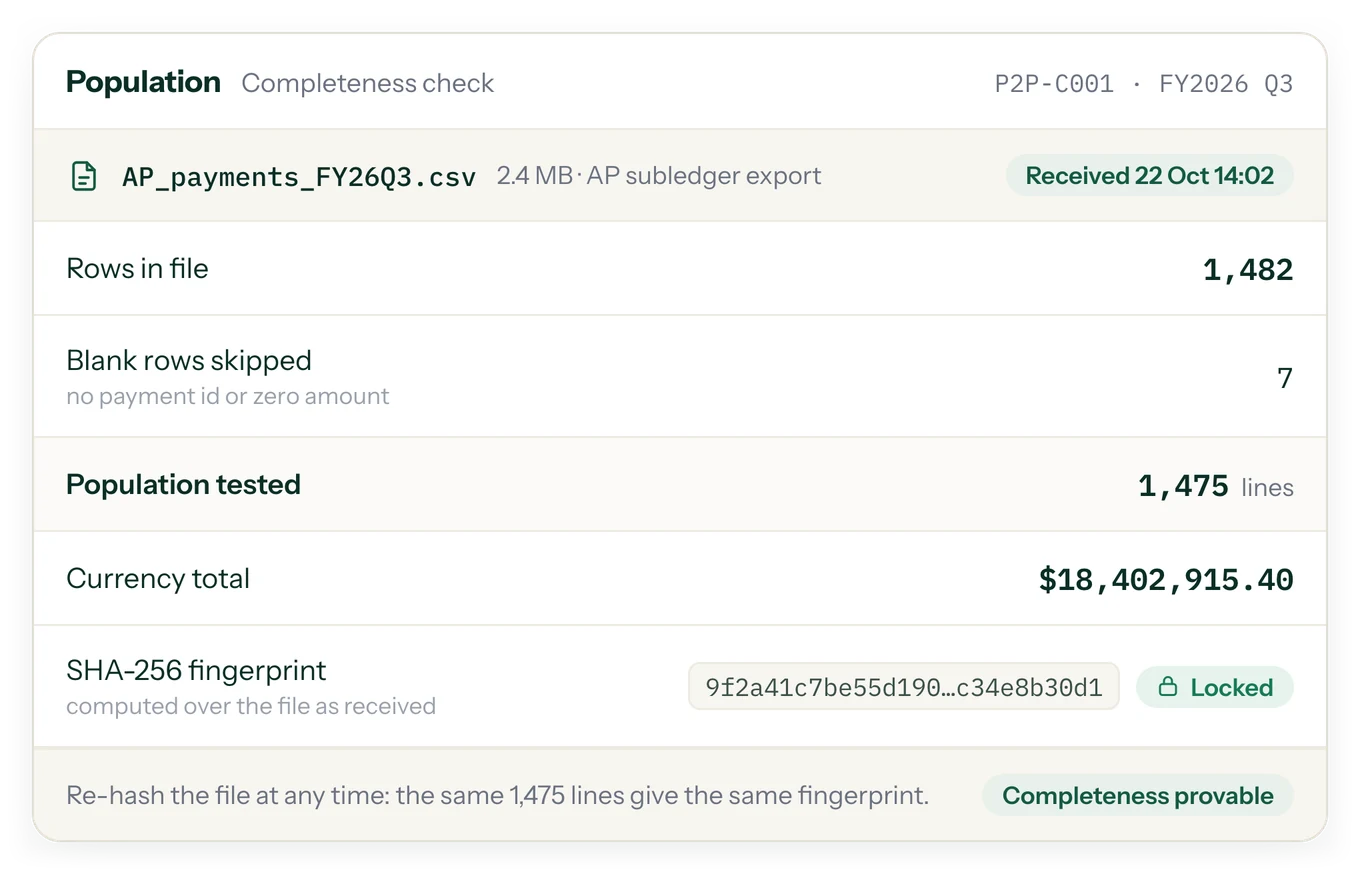
The scoped matrix, the concluded and locked test memos, the evidence with a SHA-256 on each file, the audit trail export and a manifest of digests, in one download. Whoever receives it can verify every file themselves.
The documents behind your controls, kept current.
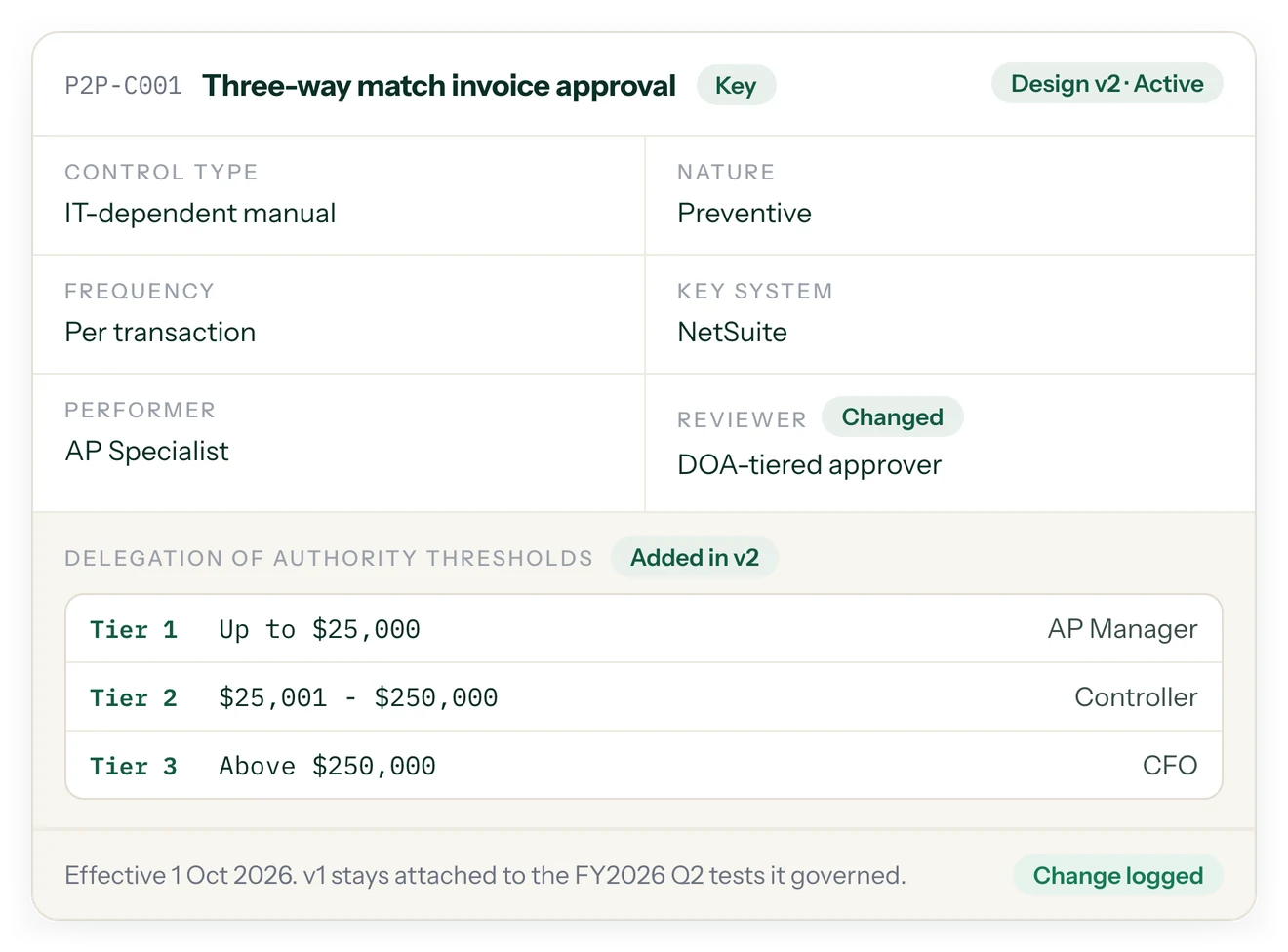
Global documents carry validity and expiry tracking with versioning, so every control links to the exact document version that was in force when it was tested.
Who can see, test, review or approve, entity by entity.
Team members are scoped per entity with a clear role, and the MFA policy banner flags any admin or approver who has not turned on multi-factor authentication. Client company users are read-only by design.
SOX AUDIT TRAIL SOFTWARE
SOX Audit Trail Software for Traceable Reviews and Deficiency Management
Learn how an audit trail connects control exceptions, remediation, retesting, and final review.
What Is a SOX Audit Trail?
A SOX audit trail is a record of relevant actions, decisions, and changes made during a Sarbanes-Oxley control testing process. It helps teams understand who performed an action, what changed, when it happened, and why a decision was made. A well-organized record can make control testing easier to review because the final conclusion remains connected to the activities and evidence that support it.
When control testing is managed across spreadsheets, email, shared folders, and separate issue trackers, reconstructing the history of a decision can take time. An audit trail within a dedicated workspace brings those in-platform events into a consistent record. SOXLayer provides an append-only, hash-chained log designed to make recorded activity verifiable, alongside workflows for tracking deficiencies from an identified exception through remediation and retesting.
Why Audit Trail Software Matters for SOX Compliance
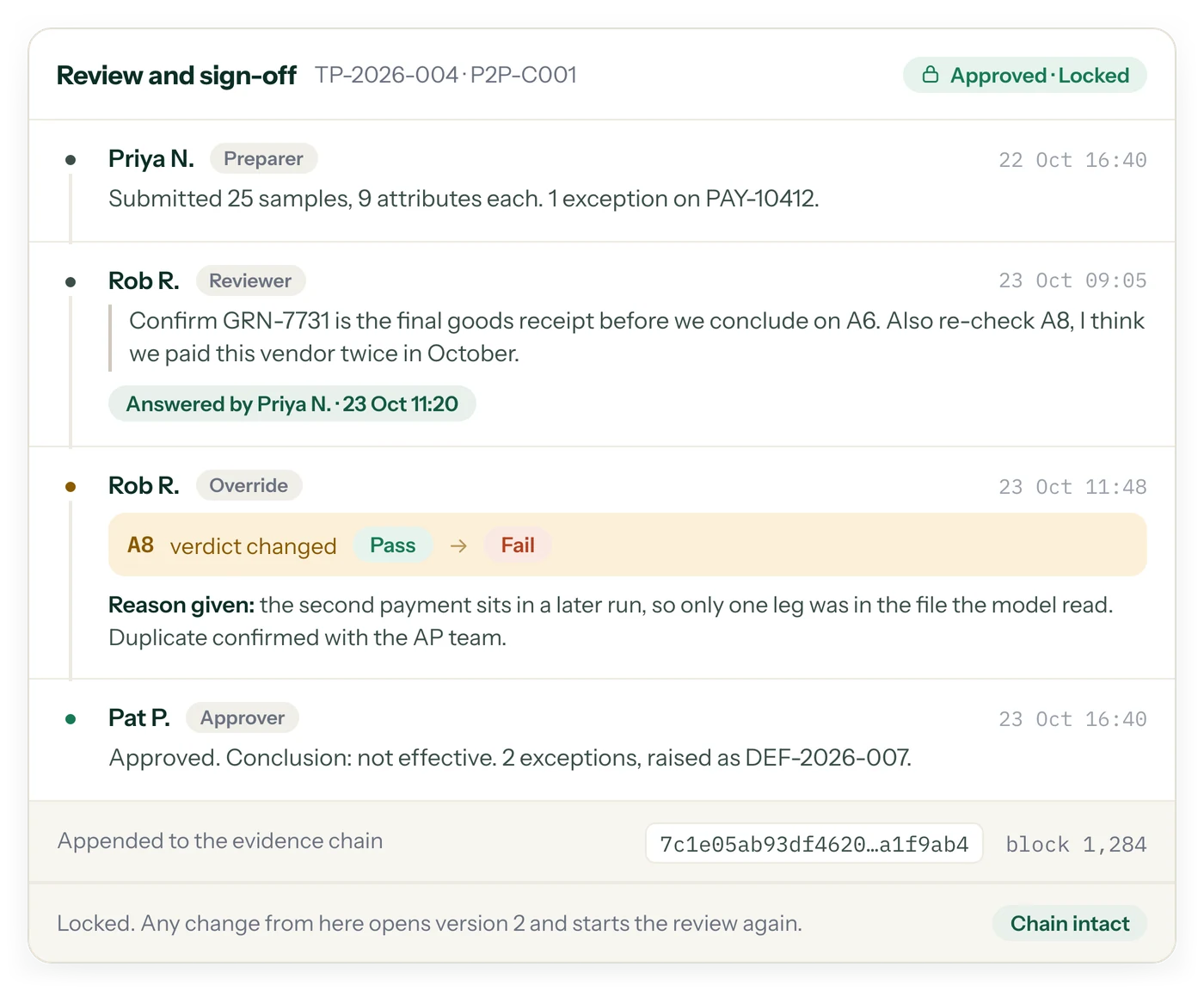
SOX compliance work depends on reliable documentation, clear ownership, and reviewable conclusions. Teams need to retain the context behind control testing, including the evidence reviewed, the result recorded, the person who reviewed it, and any later change. Without a clear history, a reviewer may need to ask preparers to explain earlier decisions or locate information across several systems.
SOX audit trail software can centralize important workflow events and make it easier to follow a control test from preparation to sign-off. It does not automatically prove that a control is effective or that an original entry was correct. Instead, it supports transparency by helping teams inspect the history of recorded actions and connect those actions to the broader testing process.
How a Hash-Chained Audit Trail Works
In a hash-chained log, each record includes a cryptographic hash associated with the previous record. This creates a sequence in which changing an earlier record would cause the subsequent chain verification to fail, assuming the verification process and underlying records are functioning as designed. The approach makes unauthorized changes to recorded history easier to detect than a log that can be silently overwritten.
SOXLayer describes its audit trail as append-only and hash-chained. Users can run an integrity verification to check whether the recorded chain remains consistent. That check is useful for assessing whether the log has been altered after entries were written, but it is not a substitute for access controls, secure system operations, evidence validation, or independent audit procedures. Integrity and accuracy are different questions: a record can be unchanged and still contain an incorrect original value.
Track SOX Deficiencies from Exception to Closure
A control exception should lead to a clear assessment and a documented next step. Depending on the facts and the organization’s methodology, the issue may require investigation, severity assessment, root-cause analysis, remediation, and retesting. A deficiency management workflow helps teams keep these steps connected instead of tracking each activity in an isolated spreadsheet or email thread.
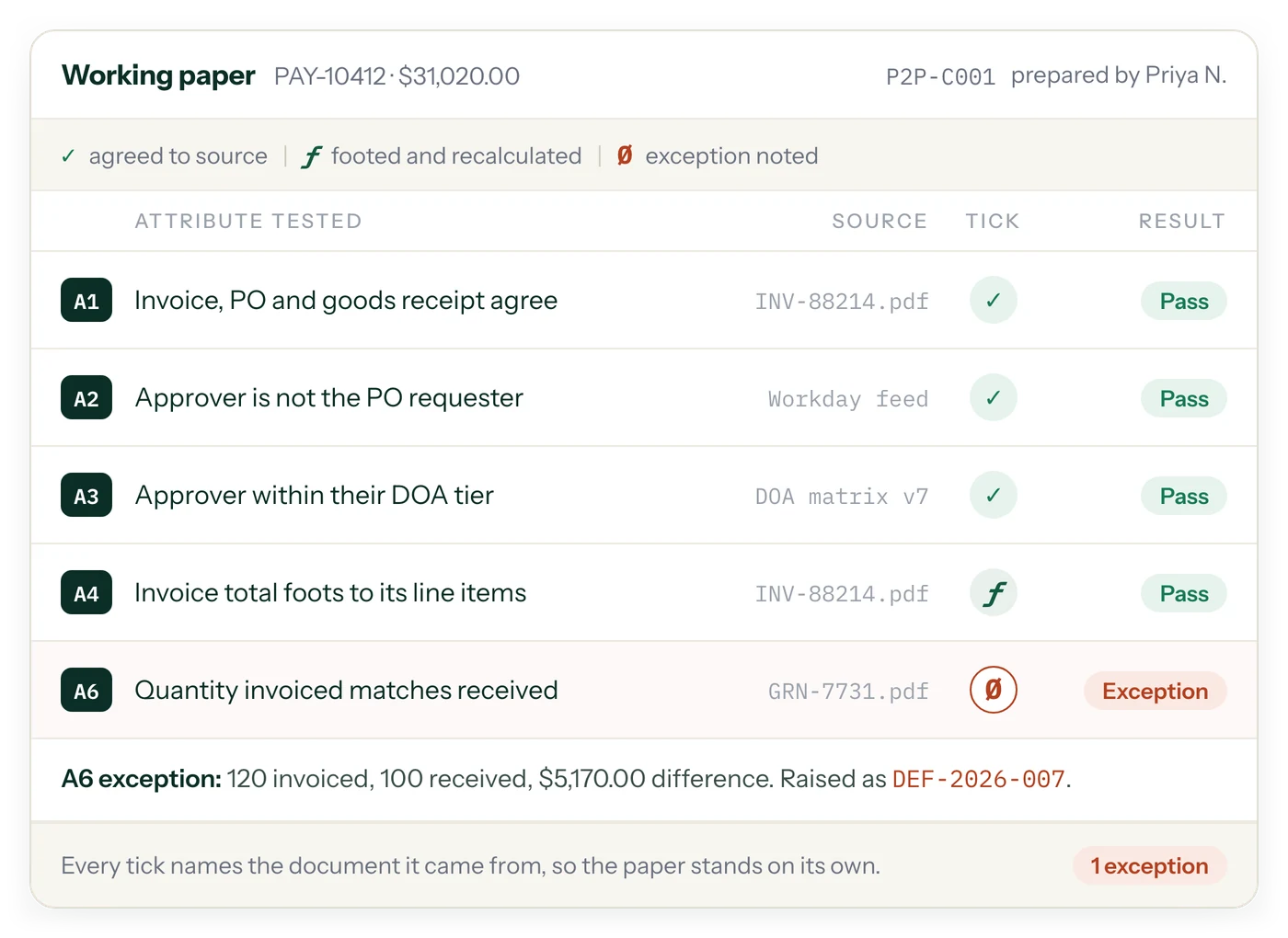
In SOXLayer, a sample marked as an exception can raise a deficiency linked to the relevant test and samples. The deficiency record can track classification, root cause, remediation actions, owners, due dates, and retest status. Keeping this information together helps stakeholders understand what was identified, who is responsible for the response, and whether the issue has progressed to a verified closure point.
Remediation Tracking and Retesting
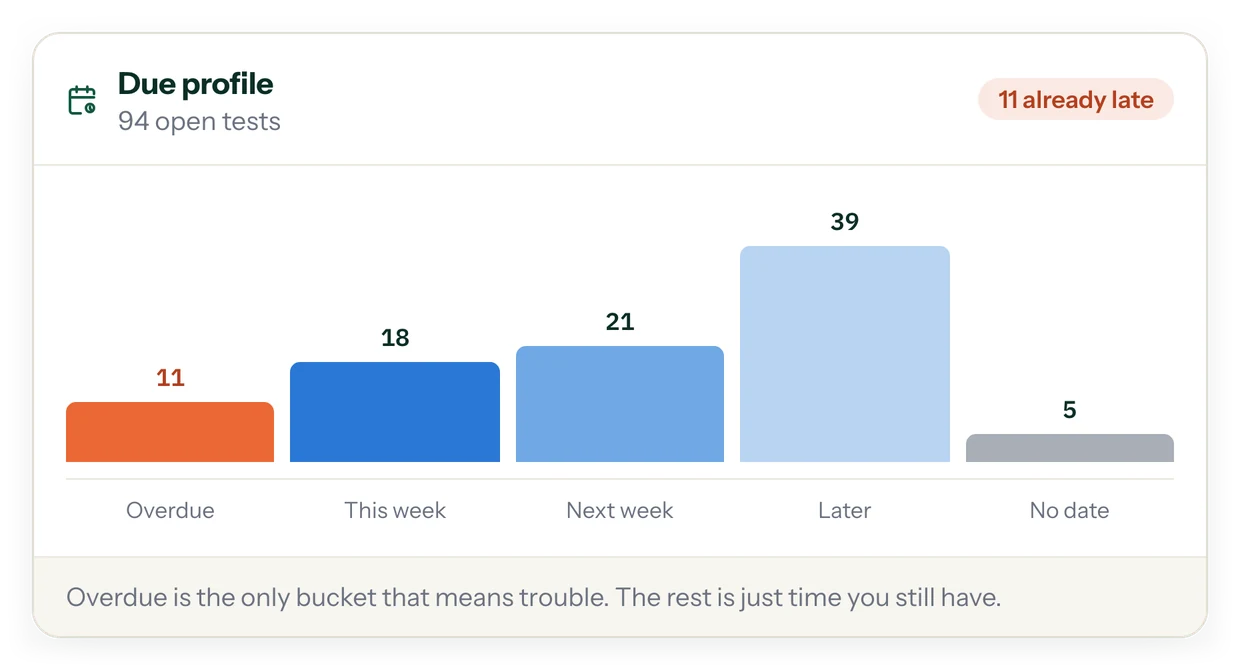
Recording a remediation plan is only one part of addressing a control deficiency. Teams also need to assign responsibility, set realistic target dates, document the corrective action, and determine whether retesting is required. Retesting provides evidence about whether the revised process or control is operating as intended under the defined criteria. Closing an issue without evaluating the retest evidence can leave uncertainty about whether the underlying problem has actually been resolved.
A structured deficiency register gives teams a place to monitor open items, overdue actions, remediation status, and retest outcomes. It can also support discussions between control owners, internal audit, finance, and compliance stakeholders. The classification and ultimate assessment of a deficiency should follow the organization’s applicable methodology and professional judgment; software supports the process but does not make that judgment on its own.
What Should a SOX Audit Trail Record?
The information captured will depend on the workflow and system design, but useful audit history commonly includes the actor, action, timestamp, affected record, relevant before-and-after values, and the reason for a change where one is required. Context matters: a reviewer should be able to understand not just that a field changed, but which item was affected and how the change relates to the testing process.
SOXLayer’s audit trail is designed to record details such as who made a change, what changed, when it occurred, the value before and after, and the reason provided. Filters by entity, actor, action, and date can help users locate relevant entries. Export options can support review and handover, subject to the records and permissions available in the workspace.
Prepare a More Organized Auditor Handover
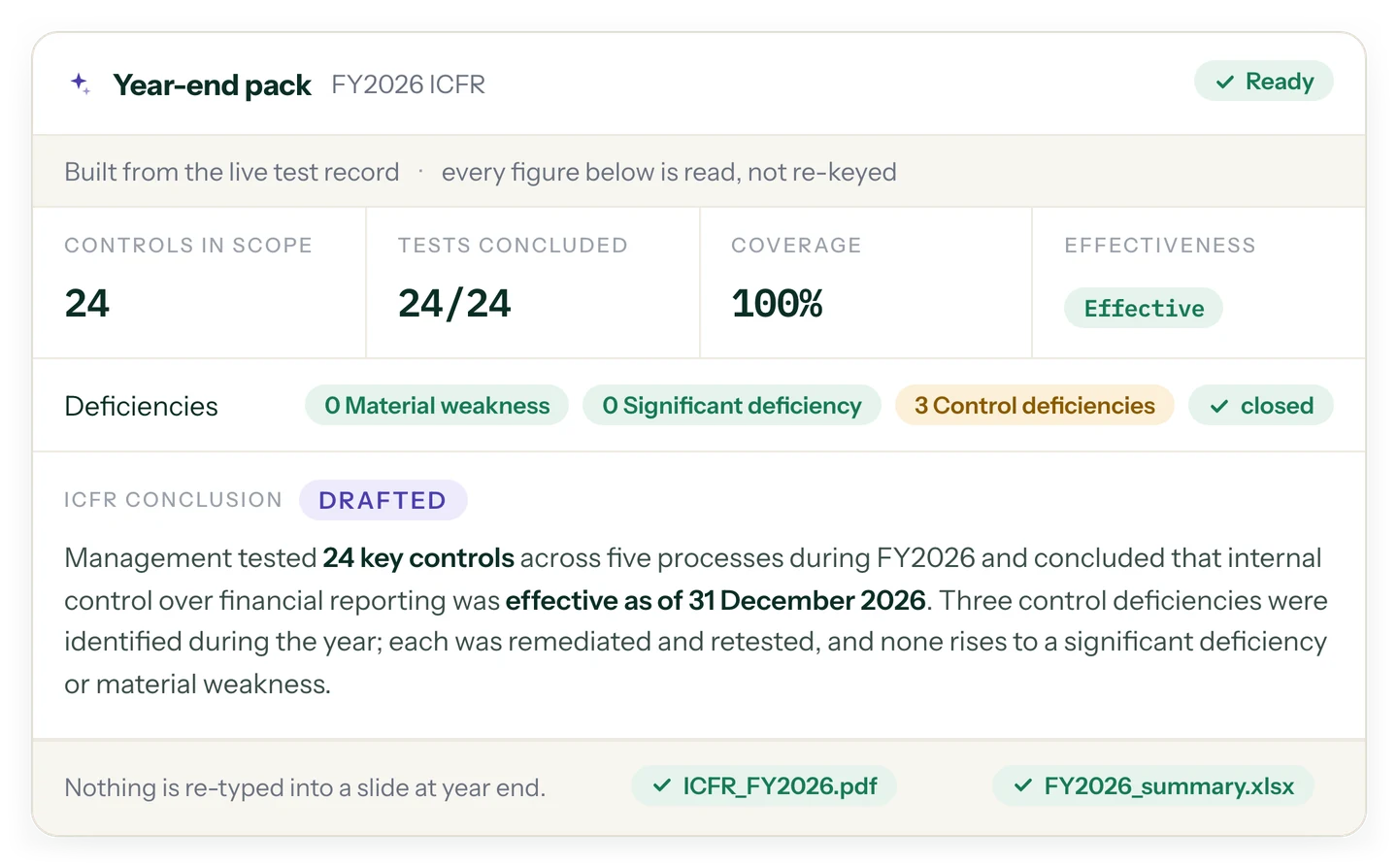
Preparing for an auditor handover can involve collecting the scoped risk and control matrix, completed test documentation, supporting evidence, issue records, and activity history. A consistent handover process helps recipients understand what is included and gives them a way to verify file integrity where appropriate. It also reduces confusion caused by multiple versions of a document or unclear naming conventions.
SOXLayer supports a handover bundle that can include the scoped matrix, concluded and locked test memos, evidence file hashes, an audit trail export, and a manifest of digests. The receiving team should still assess whether the package is complete for its purpose and whether the contents support the conclusions presented. A verifiable package can support review, but it does not guarantee auditor reliance or replace the auditor’s independent procedures.
Connect Deficiency Management with the Wider SOX Testing Cycle
Deficiencies and audit history are most useful when connected to the rest of the control testing process. A testing exception should be traceable to the control, sample, and evidence that gave rise to it. Remediation should link back to the issue, and retesting should document whether the corrective action meets the defined criteria. These connections help reviewers follow the lifecycle without repeatedly rebuilding context from separate records.
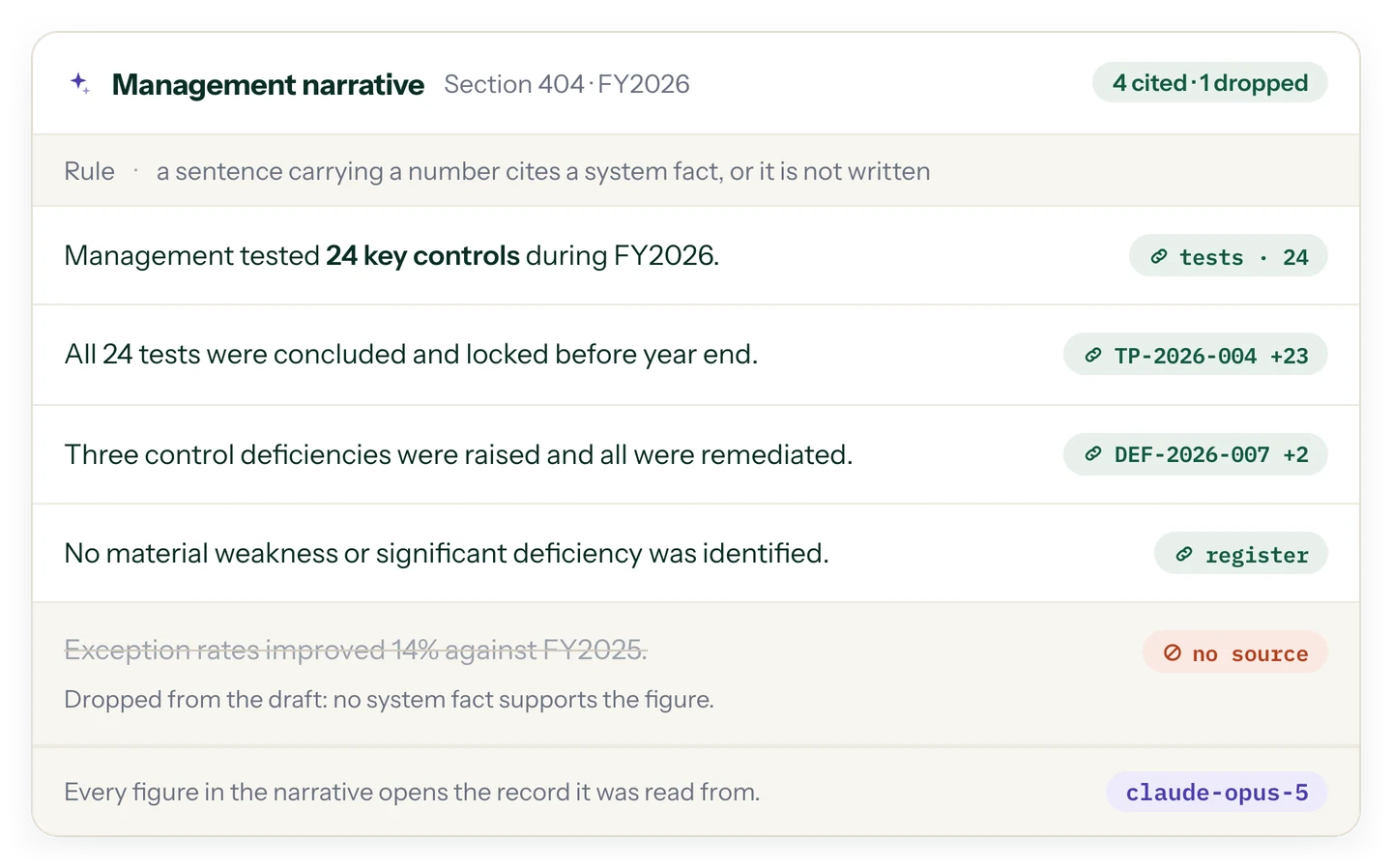
SOXLayer combines audit trail and deficiency workflows with its broader SOX control testing workspace and AI-assisted evidence testing. AI-assisted testing can help prepare evidence-based attribute results, while human review remains important for assessing exceptions and determining final conclusions. For details about controls around information handling, see the SOXLayer security page.
Choosing SOX Audit Trail Software
When comparing SOX audit trail software, look for clear event history, useful search and filtering, appropriate permissions, export options, integrity verification, and links between control tests and deficiency records. Consider how the system supports remediation ownership, due dates, retesting, and handover. It is also important to understand the limits of the log: it can record activity within the platform, but it will not automatically capture work performed in external spreadsheets or email unless that activity is brought into the system.
SOXLayer is built to help teams maintain a traceable record of control testing activity and manage deficiencies through remediation and retesting. Explore the product overview for the complete workflow, review SOXLayer pricing and plans, or visit the contact page to discuss your team’s needs. Select a process that fits your organization’s control environment, documentation standards, and review requirements.
FAQ
Questions about the audit trail and deficiencies
Can an entry in the audit trail be changed after the fact?
The log is append-only, so it can only grow. Each row carries the hash of the row before it, which means any edit after the fact breaks the chain and the verification says so.
How do we check that nothing was altered?
Click "Verify integrity". It recomputes each row's hash from the row before it and reports whether the chain is unbroken. You can run it, and so can your client.
What does each row record?
Who made the change, what changed, when, the value before and after, and the reason given for it.
Can we export the audit trail?
Yes. Filter by entity, actor, action and date, then export as CSV or JSON. The deficiency register exports as a spreadsheet.
How is a deficiency raised, and when is it closed?
A sample marked as an exception raises a deficiency automatically, linked to the test and the samples behind it. It is closed only after a retest confirms the control is working.
What do we hand over at the end?
One handover bundle: the scoped matrix, the concluded and locked test memos, the evidence with a SHA-256 on each file, the audit trail export and a manifest of digests. Whoever receives it can verify every file themselves.
What does the audit trail not do?
It records what happens inside SOXLayer, so work done in spreadsheets or email outside it is not in the log. "Verify integrity" proves that no entry changed after it was written; it cannot tell you whether the original entry was right. And SOXLayer is not an audit firm: it does not give an opinion on your controls or replace your external auditor. See the Terms and how evidence is stored on the security page.
Bring one control. Get the first pass back with a citation on every verdict.
Start a 14-day free trial with 5 AI sample tests. No card needed.