
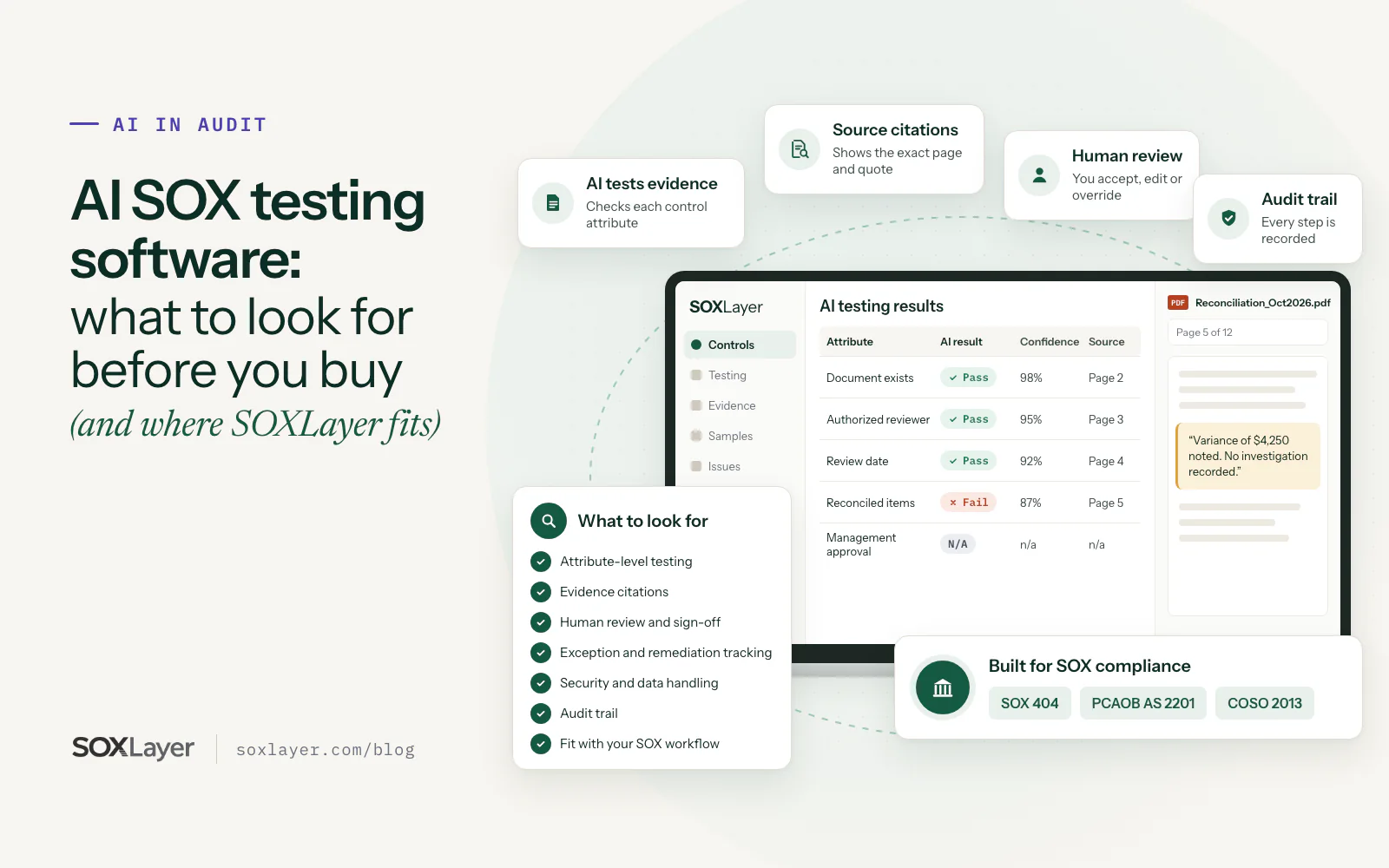
AI SOX testing software is worth buying only if every result it proposes traces to a page you can check, a person signs off every test, and the audit trail shows who decided what. Speed comes after that. A fast answer you cannot verify is just a faster way to create review work.
SOX control testing involves a lot of repetitive work: collecting evidence, reviewing samples, checking attributes, documenting exceptions and preparing workpapers. AI can take a real share of that reading. This guide covers the eight things to check before you buy, the questions to ask any vendor, and where SOXLayer fits.
The short version
- Test against your control attributes, not a general document summary
- Every result cites the exact quote and page
- A person accepts, edits or overrides, and signs off the test
- Exceptions are tracked from flag to deficiency to remediation
- Security, audit trail and workflow fit matter as much as the AI
- Pilot it on one control with evidence you already know the answer to
What is AI SOX testing software?
AI SOX testing software uses artificial intelligence to help test internal controls over financial reporting. Depending on the product, it can help teams:
- Organize control information and test plans
- Review evidence for selected control samples
- Extract details from documents
- Compare evidence with the control's testing attributes
- Identify potential exceptions
- Prepare testing summaries and workpaper notes
AI supports the testing process. It does not replace the professional judgment of control owners, internal auditors or reviewers, and the final conclusion still rests on the control requirements and reliable evidence.
Why SOX teams are evaluating AI testing software
Traditional SOX testing runs on spreadsheets, manual evidence requests and repeated document review. That takes time, especially when a control generates many records or the evidence sits across several systems. Nobody has ever said their favorite part of SOX season was opening the thirtieth reconciliation PDF.
AI-assisted testing can take on some of that reading, help testers find the relevant line, and point them at the exceptions worth investigating. Speed alone should not decide the purchase, though. A faster workflow only helps if the results stay accurate, traceable and reviewable.
1. Check how the AI SOX testing software tests control attributes
Start with one question: what does the AI actually test? Some tools summarize documents or answer questions about uploaded files. SOX testing needs something narrower.
A control has several attributes. A monthly reconciliation control might require:
- The correct account and reporting period
- Review by an authorized person
- Approval before a defined deadline
- Investigation of significant differences
The software should evaluate the evidence against those criteria, one attribute at a time. Ask whether it supports attribute-level testing, how results are shown, and whether your team can review and update the testing criteria.
2. Look for evidence citations on every result
An AI result should connect to the evidence that supports it. A result without a source is hard to verify: the tester ends up searching the document again to work out why the AI said what it said.
Look for a clear reference to the source document, the page and the relevant text. If the system flags a missing approval, the reviewer should be able to open the evidence and see what was found, or what was not.
Citations do not make a result correct. They make it quick for a person to check whether it is.
3. Make sure human review is built in
AI should not sign off SOX control tests on its own. A responsible workflow lets a qualified person review the proposed result, inspect the evidence, and accept, edit or override it. Ask:
- Can a reviewer change an AI-proposed result?
- Does an override require a recorded reason?
- Is final approval clearly assigned to a person?
- Are review decisions retained?
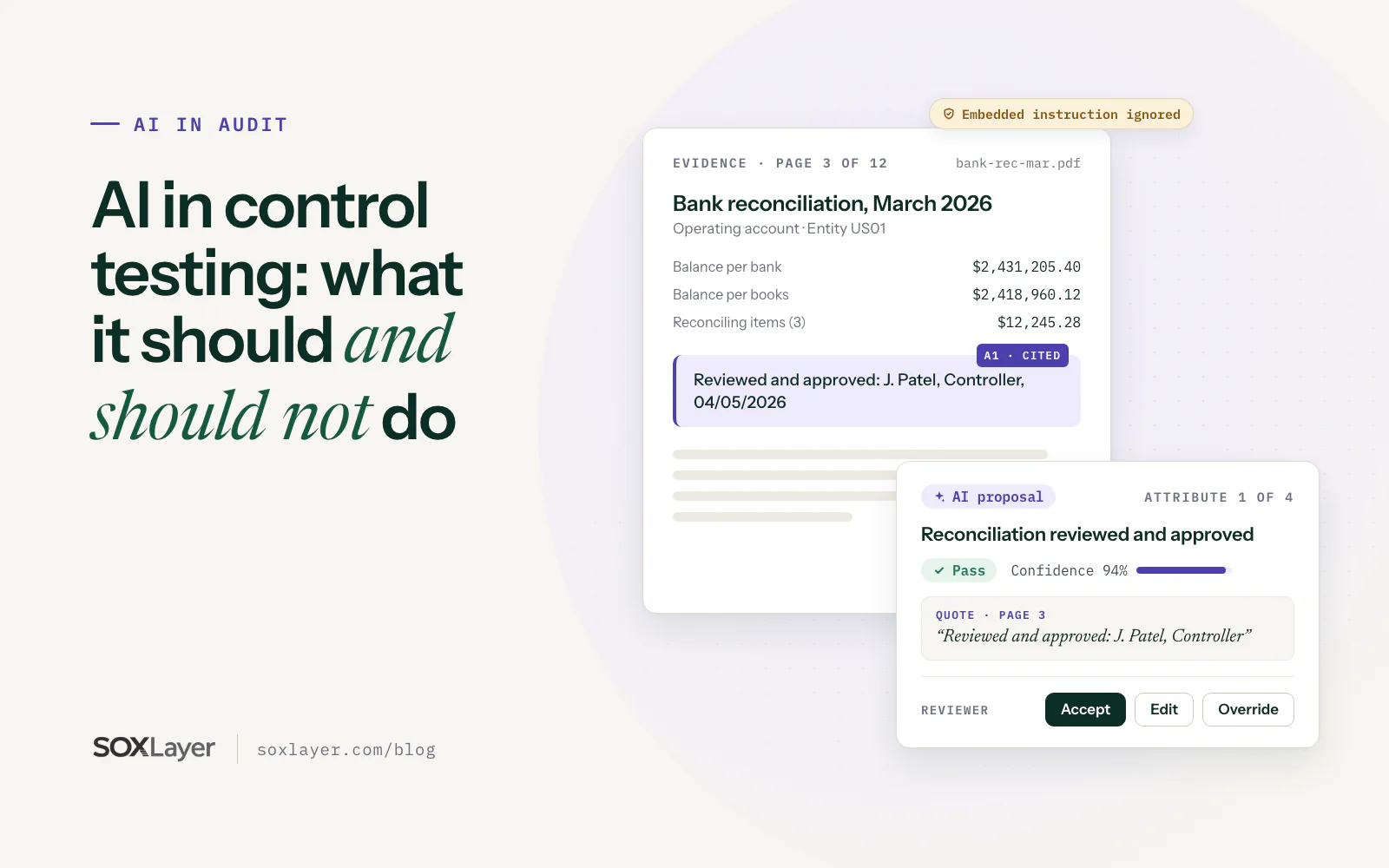
Human review is not a checkbox at the end. It is the part of AI-assisted control testing your auditor will look at first. AI in auditing: what it should and should not do goes deeper on where the line sits.
4. Understand how exceptions are handled
An AI flag is not a confirmed control deficiency. A system might flag a reconciliation because the approval date is missing from the file, while the approval exists in another approved record. The tester has to investigate and decide whether the control requirement was actually unmet.
Look for software that tracks an issue from the first exception through investigation, conclusion and remediation, and keeps these apart:
- An AI-generated flag
- A potential testing exception
- A confirmed deviation
- A deficiency that needs further assessment
That separation stops preliminary AI output from being read as a final audit conclusion. The deficiency classification guide covers the last step.
5. Review the audit trail
SOX testing needs a clear record of the work performed and the decisions made. Check whether the software records:
- The evidence used
- The testing criteria applied
- The AI-proposed result
- The reviewer's decision
- Any edits or overrides, with reasons
- The final sign-off
Then ask whether changes can be traced and whether the history is protected from alteration. "We keep logs" and "you can prove the log was not edited" are different answers.
Start your 14-day free trial
Bring one control and its evidence. The trial includes 5 AI sample tests and 50 manual ones, no card needed.
6. Evaluate security and data handling
SOX evidence can contain sensitive financial, employee and business information. Before uploading any of it, find out how the tool handles it:
- Who can access uploaded evidence?
- Can access be restricted by role and by entity?
- How is data protected in transit and at rest?
- Is customer information used to train AI models?
- How long is evidence retained?
- Can you export or remove your data?
Read the vendor's current security documentation rather than relying on the word "secure" on a homepage. The tool has to fit your organization's security, privacy and governance requirements.
7. Check whether it fits your existing SOX workflow
Good AI features can still create extra work if the tool does not match how your team runs controls and evidence. Check how it supports:
- Risk and control matrix (RCM) management
- Test plans and samples
- Evidence collection and organization
- Test results and exception review
- Deficiency tracking and remediation
- Workpaper documentation and sign-off
Also check which integrations exist, and whether the product handles your entities, roles and testing practices.
8. Ask how the AI is validated
AI performance varies with document quality, control complexity and how clearly the criteria are written. Ask the vendor how it evaluates its own testing:
- Can the tool say when evidence is incomplete?
- Does it give confidence information?
- How are uncertain results handled?
- Can your team run the workflow on evidence you have already reviewed?
- What happens when the model or prompts change?
A vendor should be able to show you numbers from a test set with known answers, and say plainly what the set is. Here are ours. SOXLayer keeps a labelled test set built from fictional evidence, with the right answer set by a person before the AI runs. In the 13 October 2026 baseline run, the AI matched the label on 243 of 249 attributes (97.6%) across 71 sample tests, with no wrong passes and no wrong fails. Five of the six misses were Insufficient where a person could have answered. That is our own test set, not customer data.
Where SOXLayer fits
SOXLayer is an AI-assisted SOX control testing workspace for internal audit, SOX and internal controls teams. It connects control testing, evidence, review and documentation:
- RCM: risk and control matrix management across entities
- Plans and samples: test plans and sample management
- AI testing: evidence tested at the control-attribute level, proposing Pass, Fail, Insufficient or N/A with a confidence score and the exact quote and page
- Escalation: a result under 75% confidence, a conflicting result or an Insufficient result gets one re-check by a stronger model, with the reasons listed
- Human review: people accept, edit or override (an override needs a reason), then a reviewer and approver sign off
- Deficiencies: tracked from exception through remediation
- Evidence and documents: every file gets a SHA-256 fingerprint
- Year-end: SOX 404 reporting support
- Access: role-based access for company teams and external auditors, scoped by entity
- Audit trail: a hash-chained audit trail you can verify
The important distinction: SOXLayer's AI proposes testing results, and a person stays responsible for reviewing and signing off. AI never submits, reviews or approves a test. With auto-fill on, it can record a result it is at least 90% sure of, with a verified citation, while the test is still being prepared. Anything flagged, disputed or Insufficient waits for a person, and admins can switch auto-fill off so every result waits.
On security, data is encrypted in transit with TLS 1.2 or higher and at rest with AES-256, and your evidence is never used to train AI models. You can export tests, evidence and the audit log as CSV or JSON at any time. The security page has the details.
Pricing is on the pricing page: a 14-day free trial with no card needed, Starter at $279 a month (first month $99), Professional at $799 a month, and Enterprise on a custom quote. As with any software, check the current capabilities and plan limits against your own requirements.
How to evaluate SOXLayer before you buy
A demo shows the general workflow. A pilot shows whether it works on your evidence. Pick a control with clear criteria and familiar evidence, such as a recurring reconciliation or approval control, and:
- Upload suitable test evidence through an approved process
- Review how each testing attribute is evaluated
- Check whether each cited source supports the proposed result
- Investigate anything flagged
- Have a reviewer edit or override a result
- Review the audit trail and final documentation
- Compare the workflow with your current testing process
Record what worked, what still needed manual effort, and whether your reviewers found the results useful. If one monthly control is the whole pilot, the free trial covers it. Do not buy a plan to find out.
When AI SOX testing software is not worth it
Start with your most repetitive control, not your hardest. AI saves the most reading on high-volume controls, and very little elsewhere. Hold off when:
- The control is annual and judgment-heavy, such as a goodwill impairment review
- The evidence is screenshots of screenshots or lives in one person's inbox: fix collection first
- The testing criteria are still being debated with your auditor
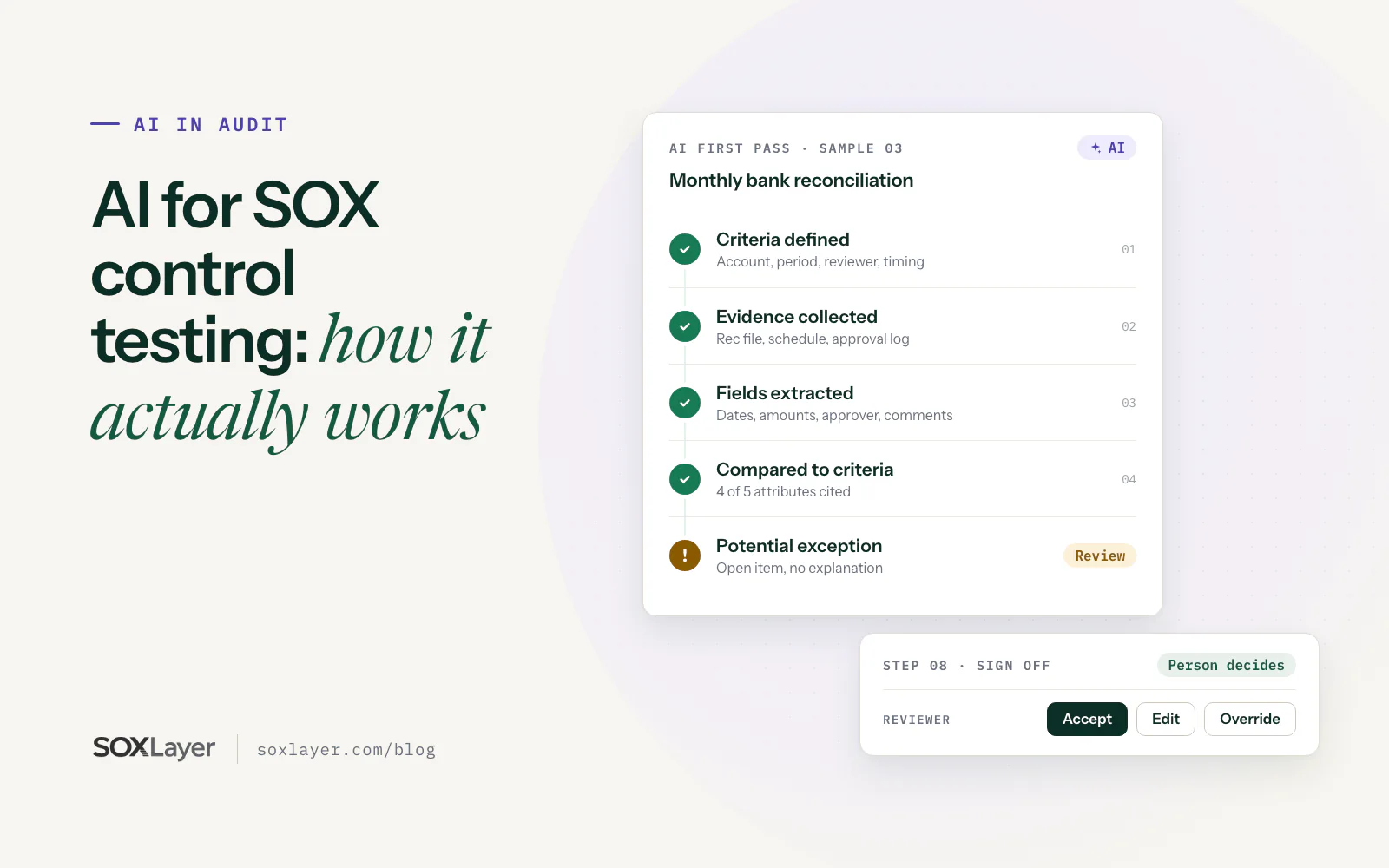
AI for SOX control testing: how it actually works walks through the full workflow step by step.
Questions to ask before you buy AI SOX testing software
- Does the software test evidence against defined control attributes?
- Does it cite the source page or text behind each result?
- Can reviewers accept, edit or override AI-proposed results, with a reason?
- Does it track exceptions and remediation?
- Can it show an audit trail that cannot be quietly edited?
- Does it support our RCM, sample and evidence workflow?
- What security and data-handling controls are in place?
- Can we run a pilot with representative evidence?
- What are the pricing, usage limits and support terms?
Key takeaways
- Judge AI SOX testing software on traceability and review first, speed second
- Attribute-level testing with a cited quote and page beats a document summary
- A person should accept, edit or override every result and sign off the test
- Keep AI flags, potential exceptions, confirmed deviations and deficiencies separate
- Ask the vendor for test-set numbers with known answers, and what the set is
- Pilot on one control you already know the answer to
Common questions about AI SOX testing software
What is AI SOX testing software?
Software that uses AI to help test internal controls over financial reporting. It can review evidence, evaluate control attributes, identify potential exceptions and organize documentation. People remain responsible for validating results and approving conclusions.
Can AI replace SOX auditors?
No. AI can take on repetitive testing tasks, but it does not replace professional judgment or the responsibilities of management, internal audit and external auditors.
What is the most important feature in AI SOX testing software?
There is no single feature for every organization. Evidence citations, attribute-level testing, human review, security and a reliable audit trail are the areas to evaluate first.
Does AI-assisted testing guarantee SOX compliance?
No. Software supports the testing process, but compliance depends on the organization's controls, evidence, methodology, governance and professional assessments.
Is SOXLayer suitable for every company?
Not necessarily. It depends on your control environment, evidence sources, security needs, testing methodology and required features. Run a pilot against your own workflow before deciding.
Sources and further reading
The standards and guidance behind this article. Your external auditor's methodology and your company's own policy still set the requirements for your program.
- PCAOB AS 2201, An Audit of Internal Control Over Financial Reporting: the auditor's standard for ICFR audits
- COSO, Internal Control: Integrated Framework: the framework most companies use to design and evaluate ICFR
- SOXLayer security: access, encryption, AI model training and audit-log integrity
The best AI SOX testing software makes the reviewer faster without making the reviewer optional.

Read these next
AI for SOX control testing: how it actually works
Eight steps from control criteria to signed-off workpaper, what AI takes off a tester's plate, when it isn't worth it, and what it costs.
AI in auditing: what it should and should not do in control testing
Why every AI verdict in SOX testing needs a quoted line and page, and why AI should never sign off a test, even when it is sure.