
SOX software for every testing cycle, in one workspace.
From the risk and control matrix through a signed-off, evidenced test and the year-end pack, SOXLayer keeps plan, test, review, reporting and audit trail connected instead of scattered across spreadsheets and email.


DEMO VIDEO
See the whole SOX testing workflow in under a minute.
A 49-second tour of SOXLayer, AI-assisted SOX control testing software: the dashboard, the risk and control matrix, the test plan, the test workspace, the deficiency register, reports and the hash-chained audit trail.
DASHBOARD
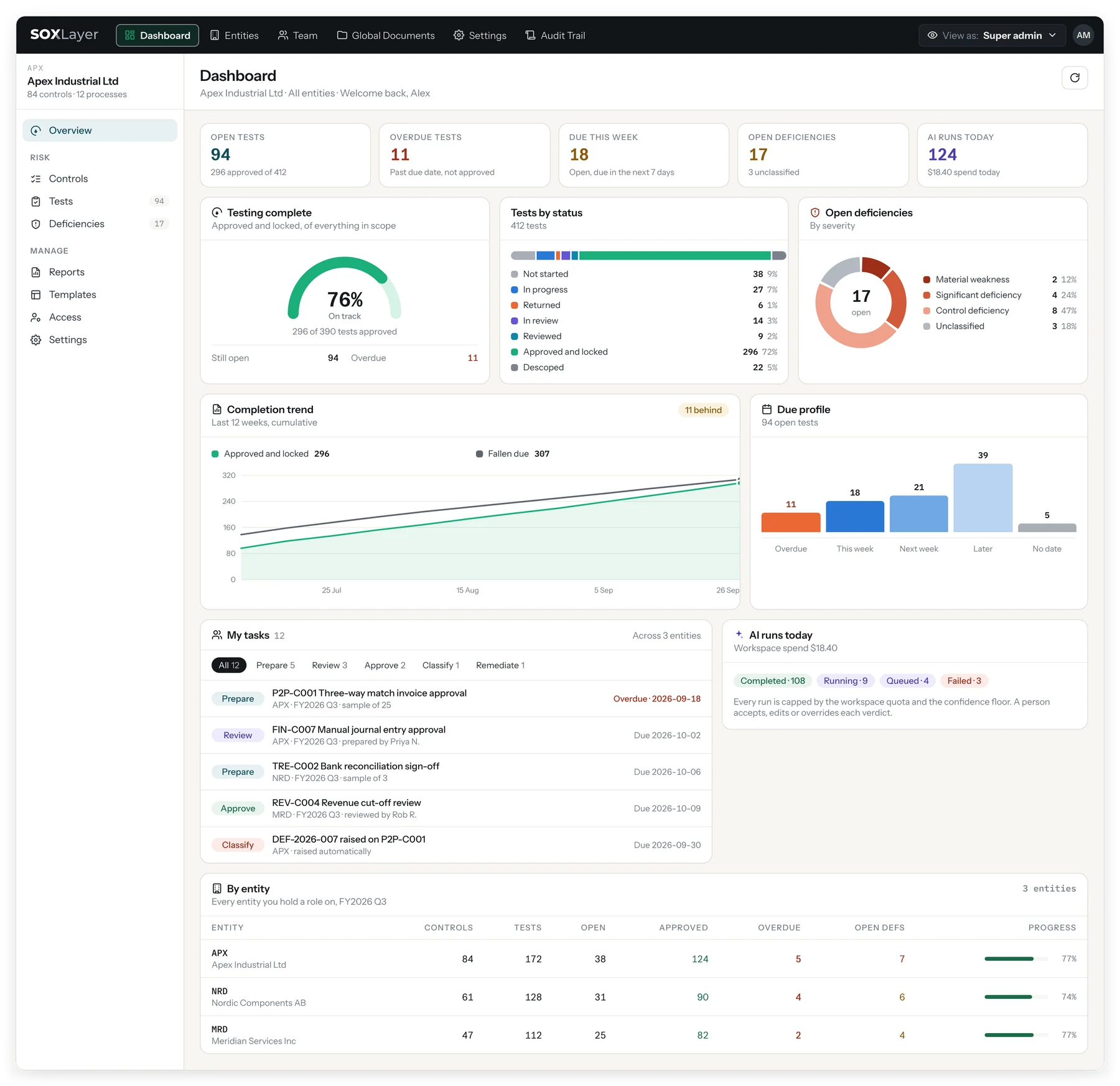
Know what needs you today, and whether the quarter is on track.
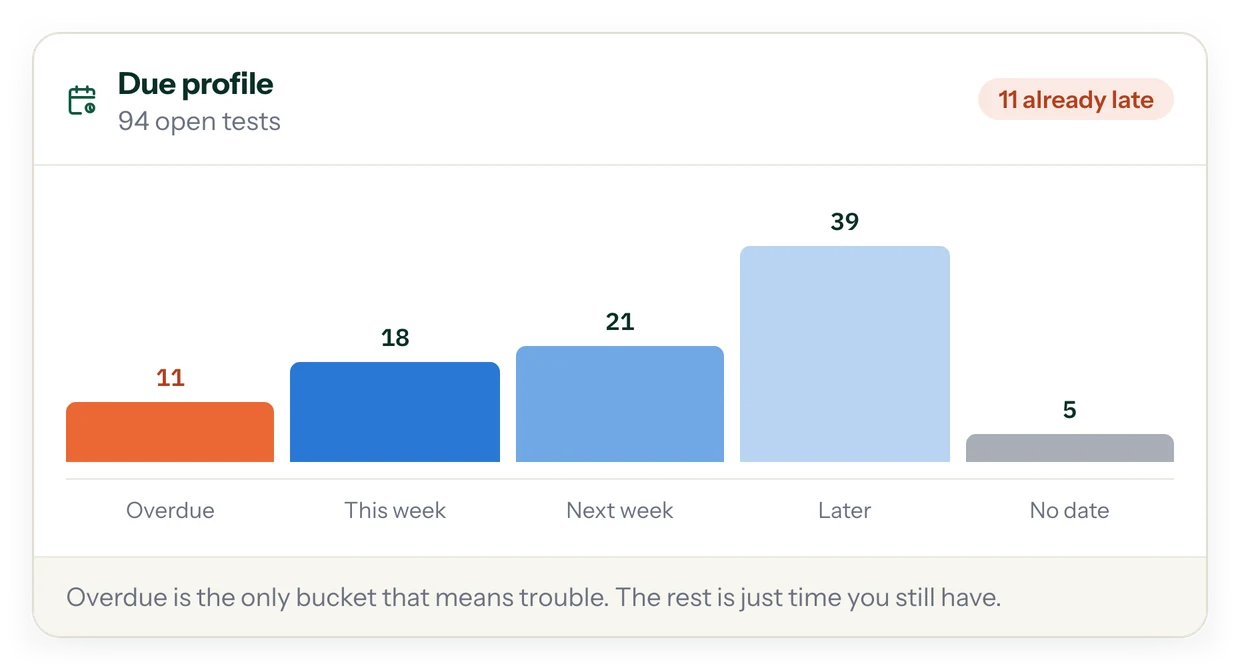
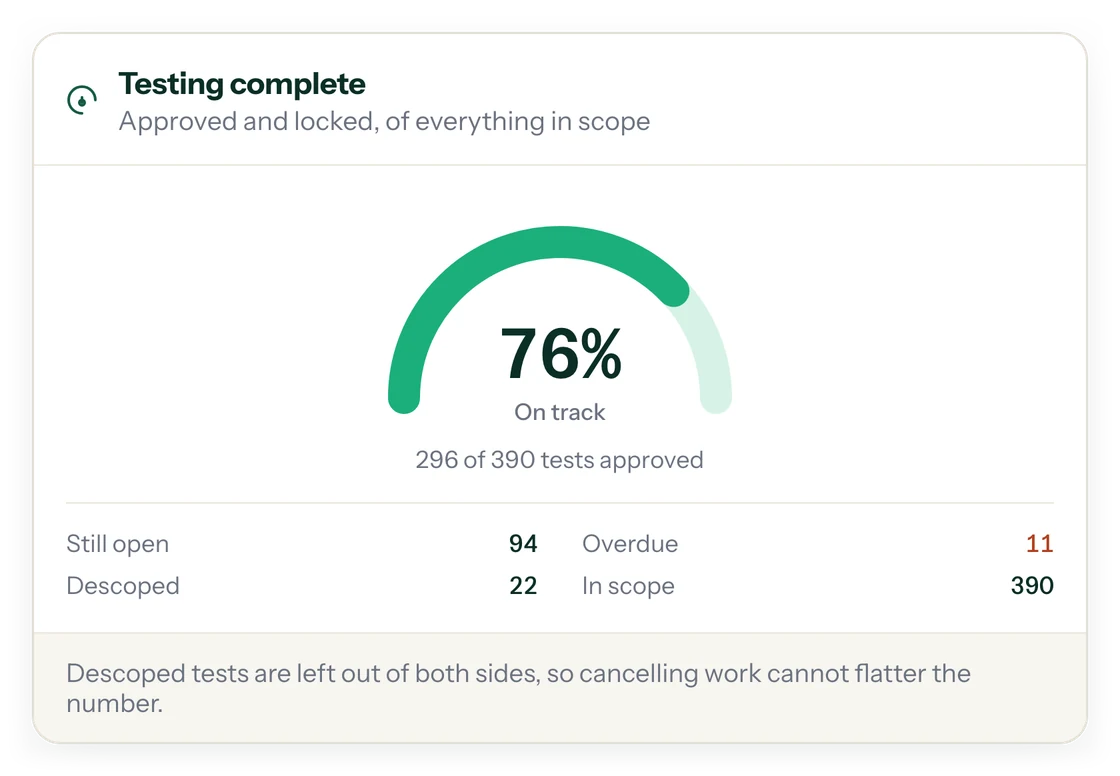
One dashboard across every entity you hold a role on: your tasks, overdue tests, the share approved and locked, and the backlog, which is the gap between tests fallen due and tests approved.
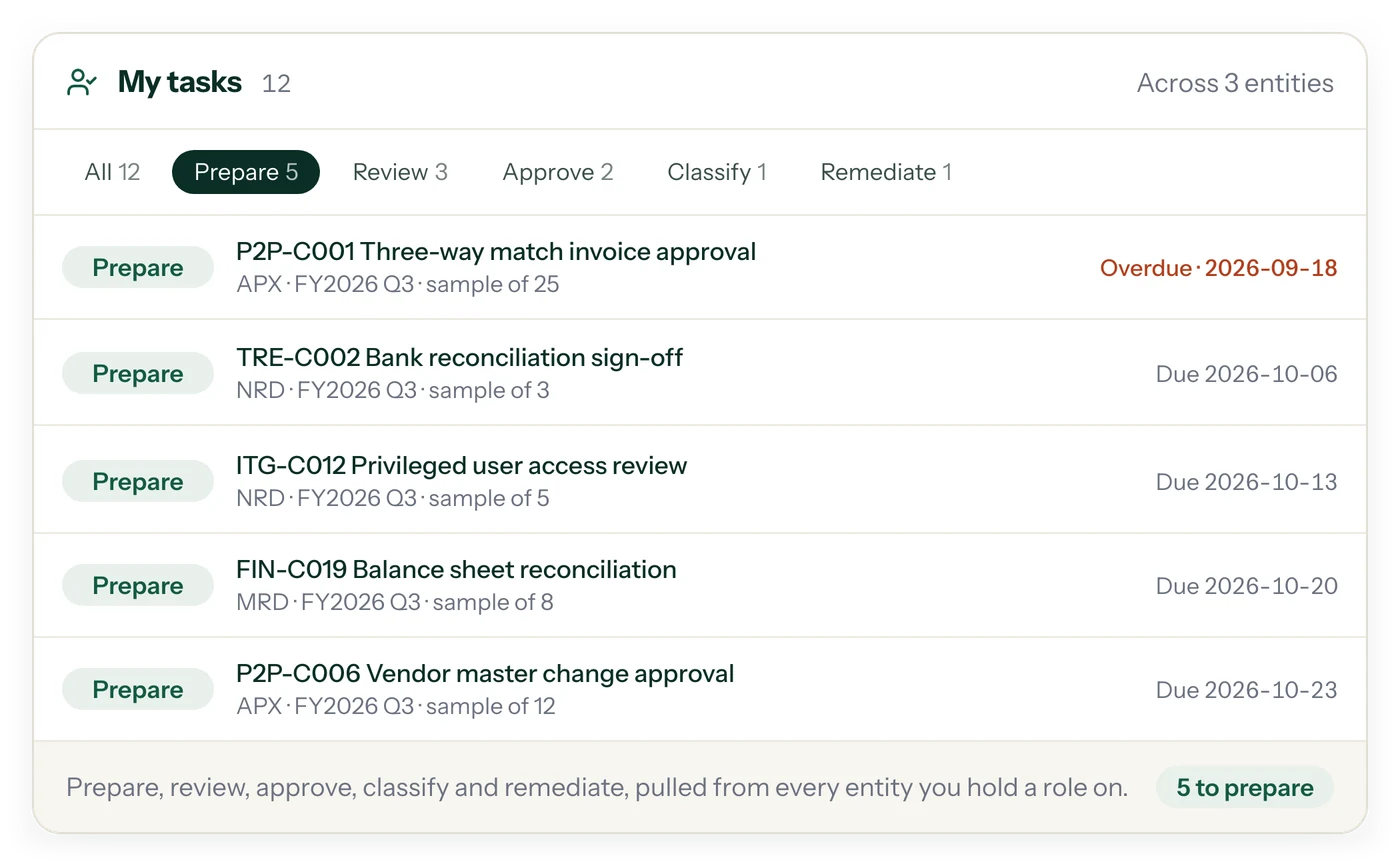
A super admin can do it all. Everyone else works from their own role.
- A super admin can prepare, review, approve, classify and remediate
- Each person gets their own login and their own roles, entity by entity, so nobody shares a super admin account
- Every role has its own rules, so the list shows only what that person can act on
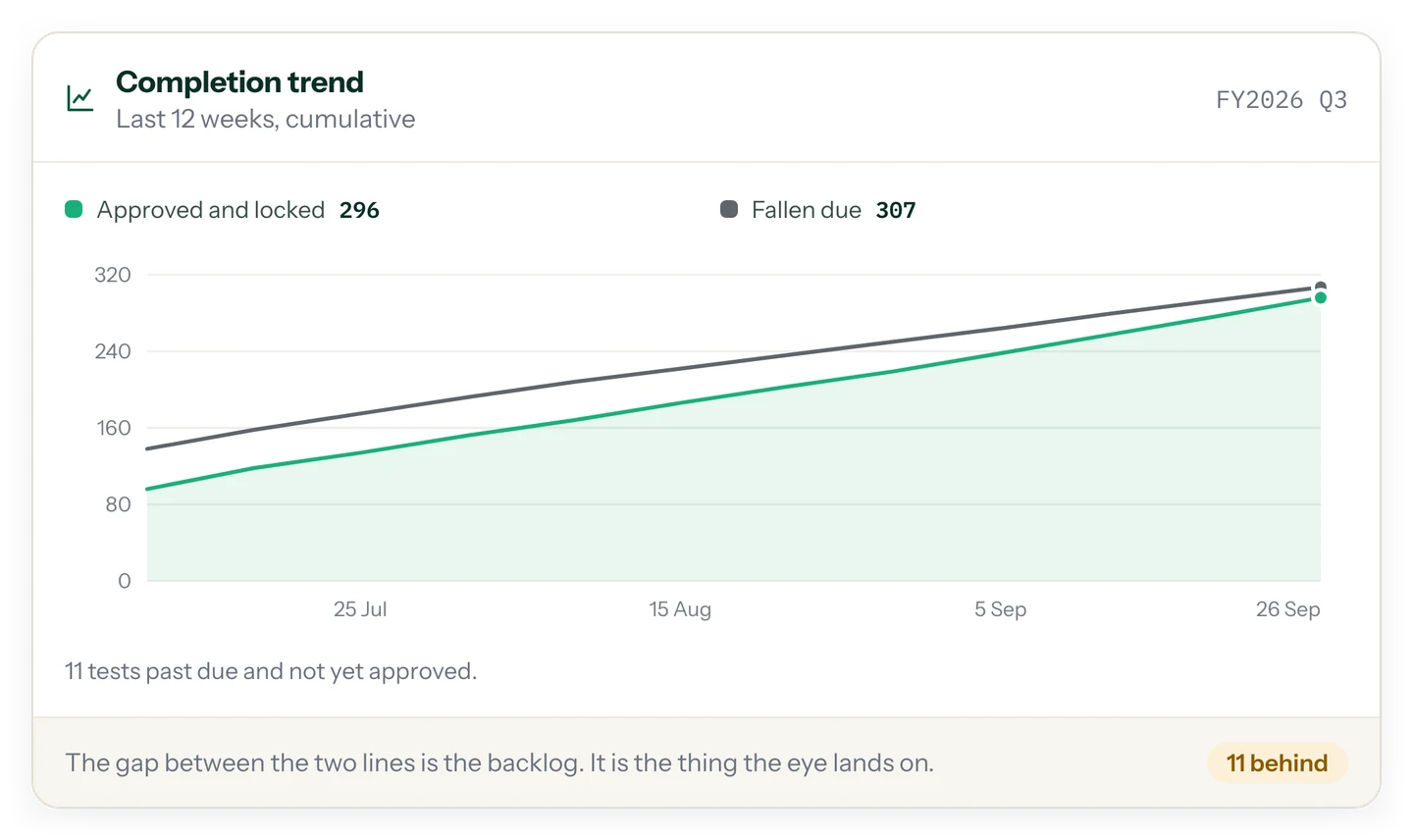
The gap between approved and due is the backlog.
- Approved and locked against fallen due, cumulative over the last 12 weeks
- Tests past due and not yet approved are counted, not estimated
- Descoped tests are left out of both sides, so cancelling work cannot flatter the number
PLAN
A multi-entity risk and control matrix, and plans that build themselves.
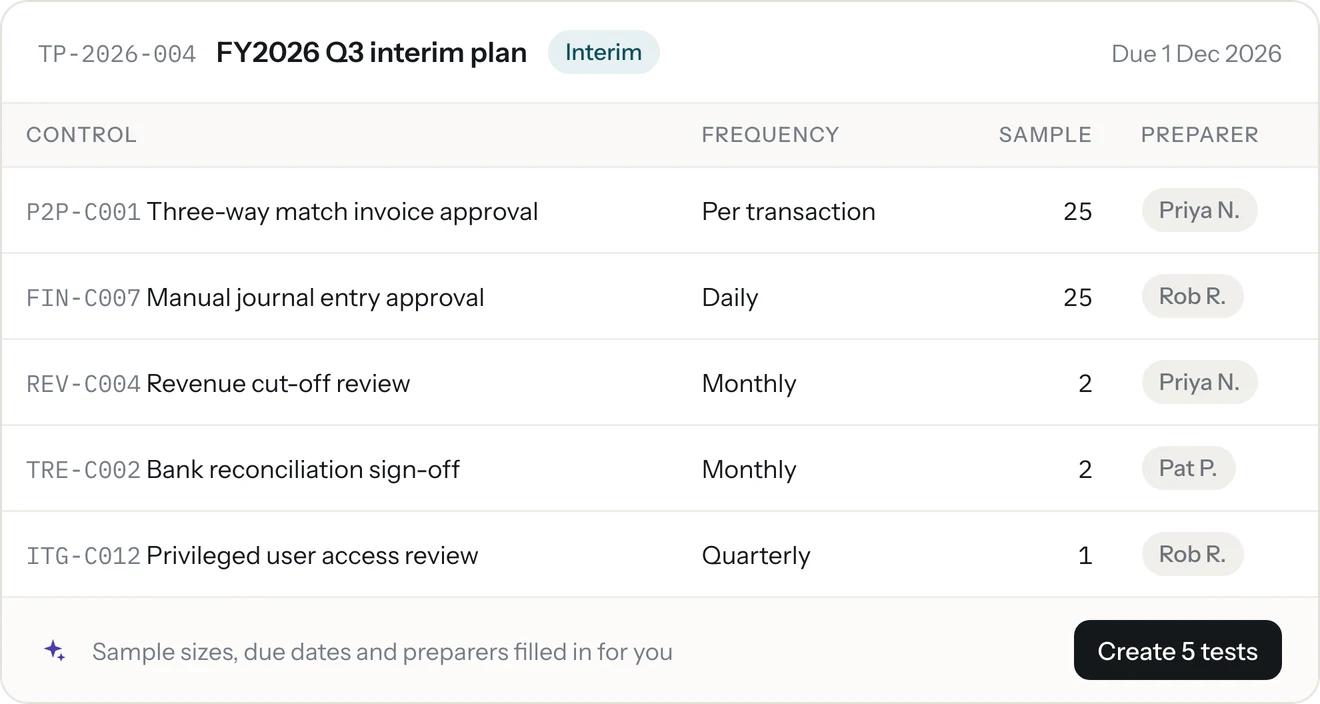
Each legal entity keeps its own controls, processes, tests and deficiencies, with a cross-entity view on top. Enter a fiscal year end such as December 31 and your testing deadlines, and SOXLayer suggests an interim plan and a roll-forward plan with sample sizes, due dates and preparers filled in. How to split the year between interim and roll-forward.
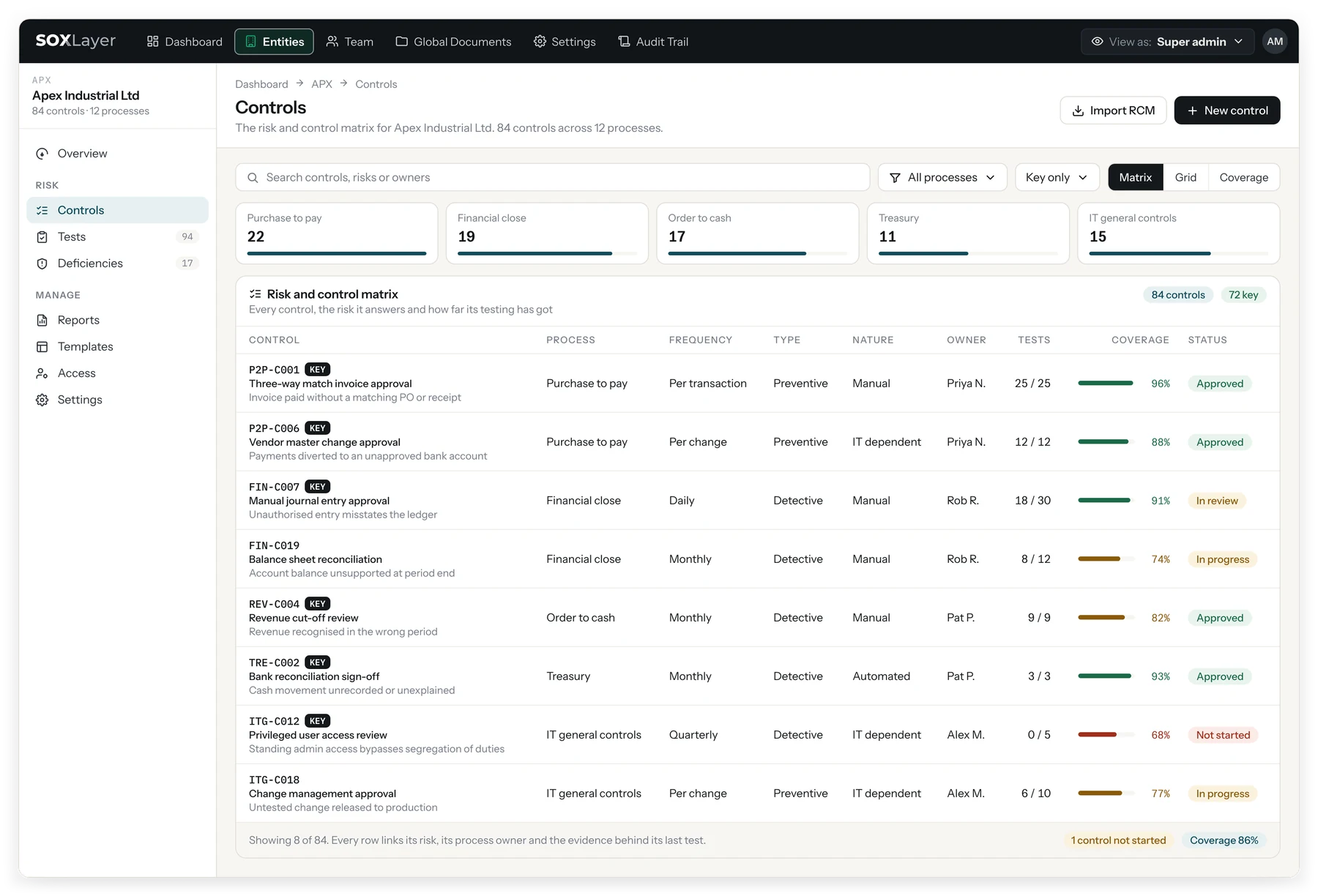
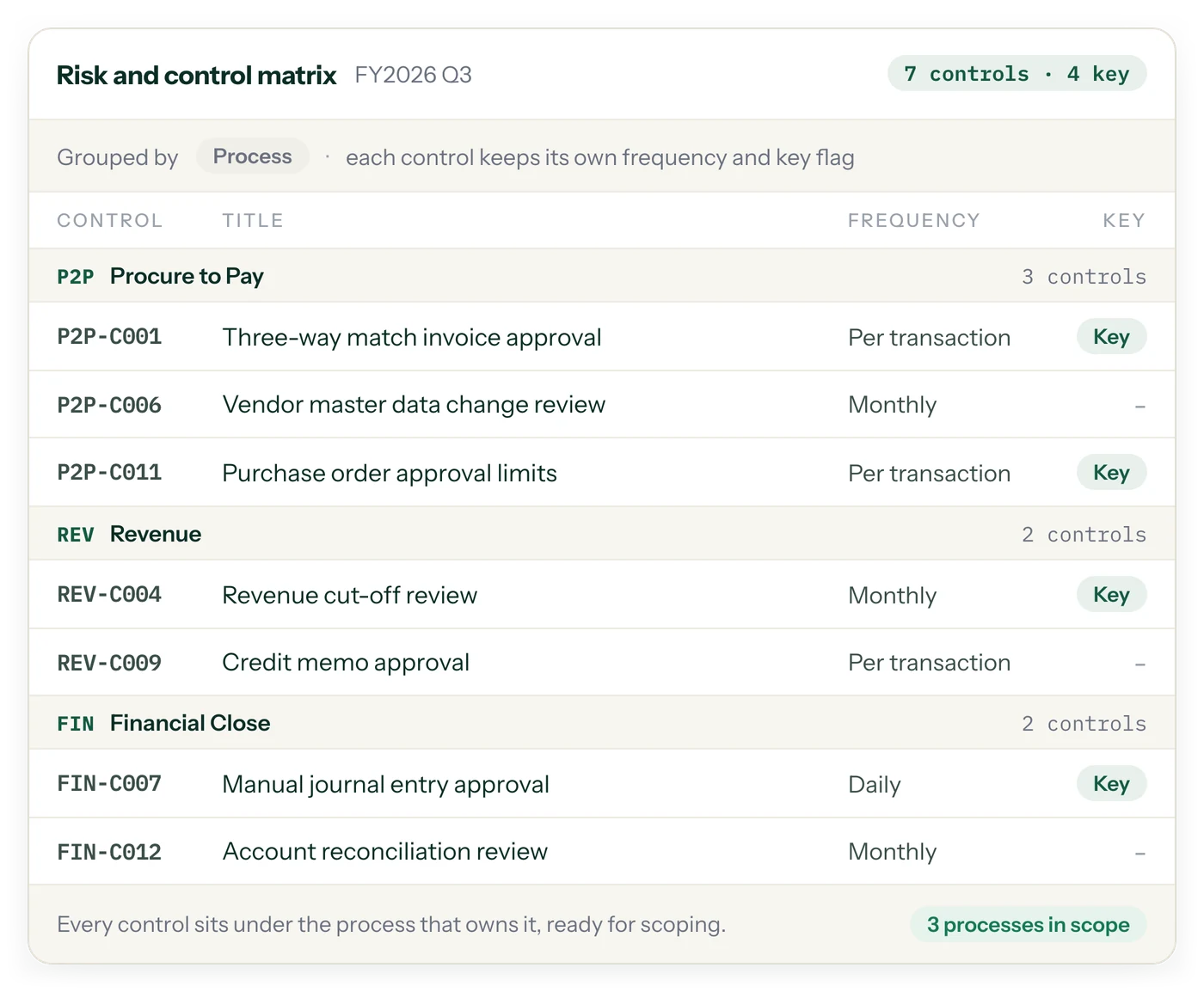
Controls grouped by process, each with its own frequency and key flag.
- Every control sits under the process that owns it, ready for scoping
- Frequency and key flag on each control
- Processes in scope, counted at a glance
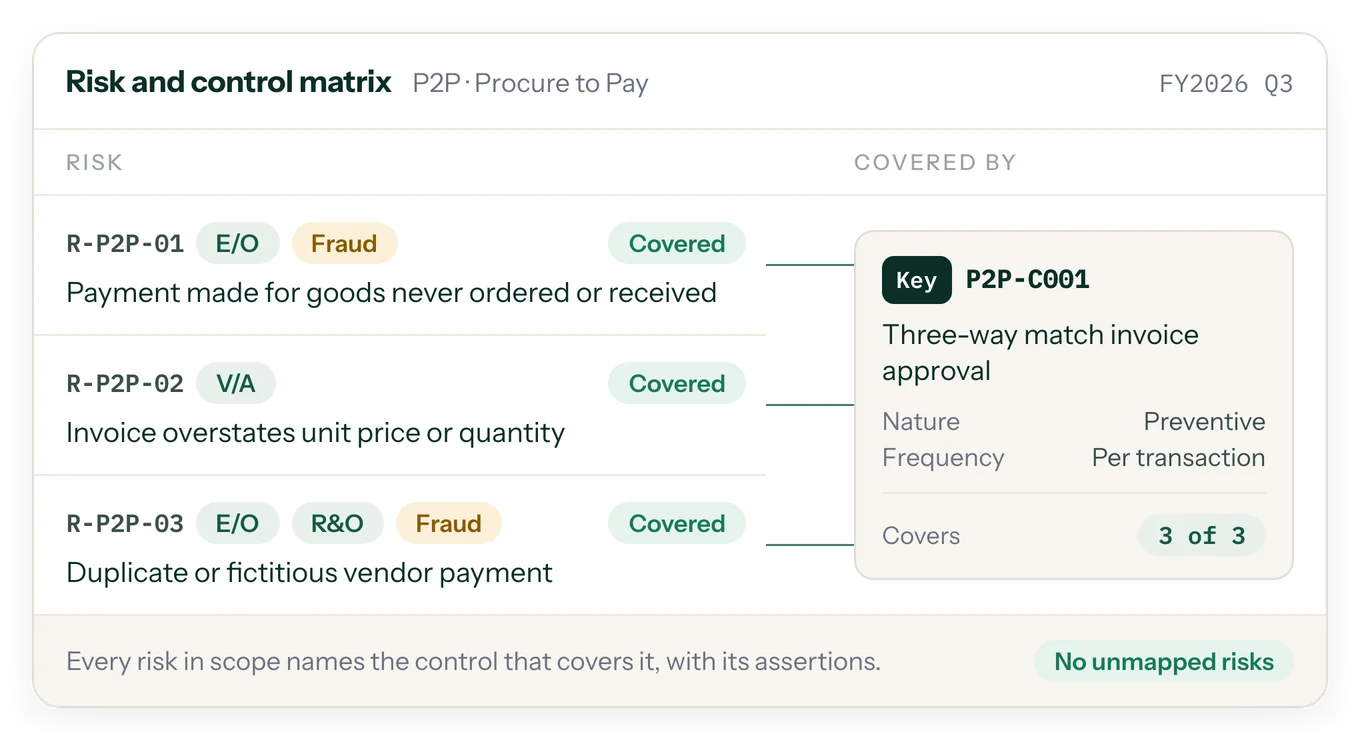
Every risk in scope names the control that covers it.
- Risks tagged by assertion: existence, valuation, rights and obligations, fraud
- Each risk shows the control covering it, and each control how many risks it covers
- Unmapped risks are counted, never assumed away
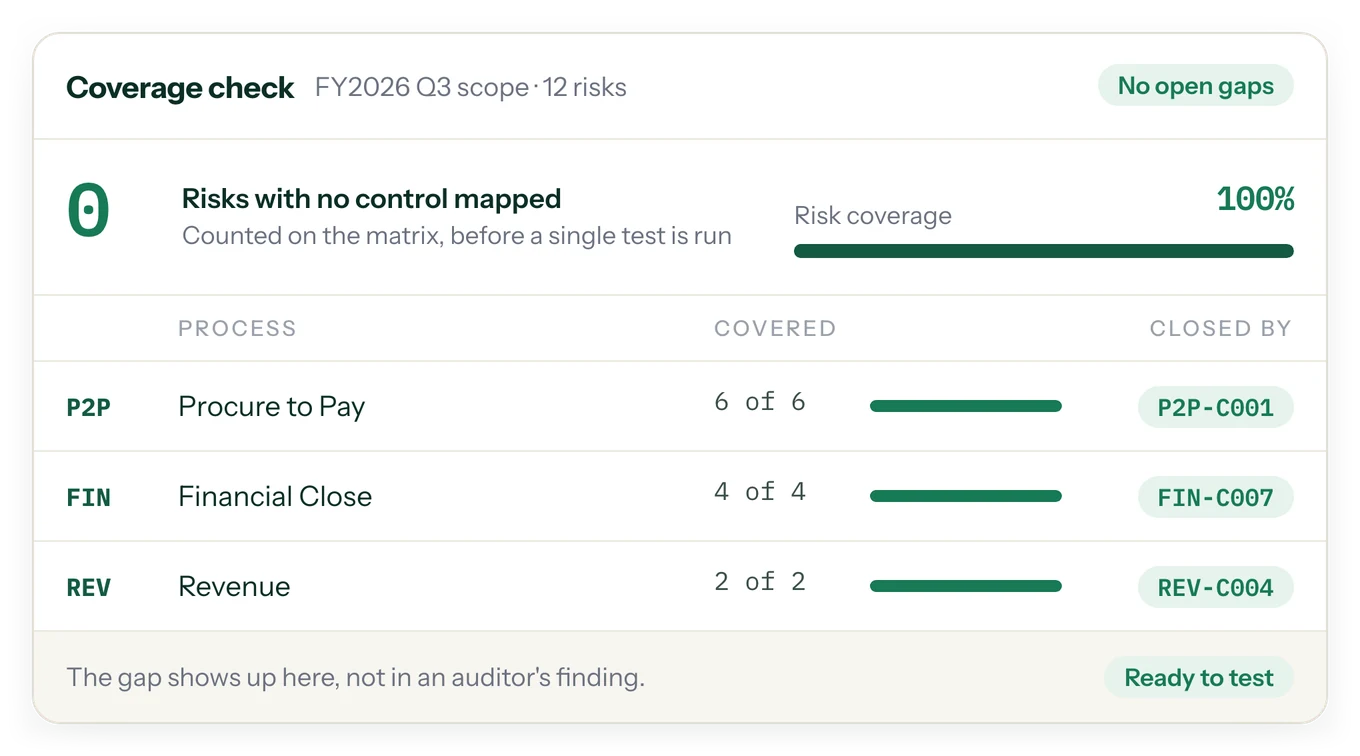
Gaps show up on the matrix, before a single test is run.
- Risk coverage per process, counted before testing starts
- Risks with no control mapped is a number you can point to
- The gap shows up here, not in a finding months later
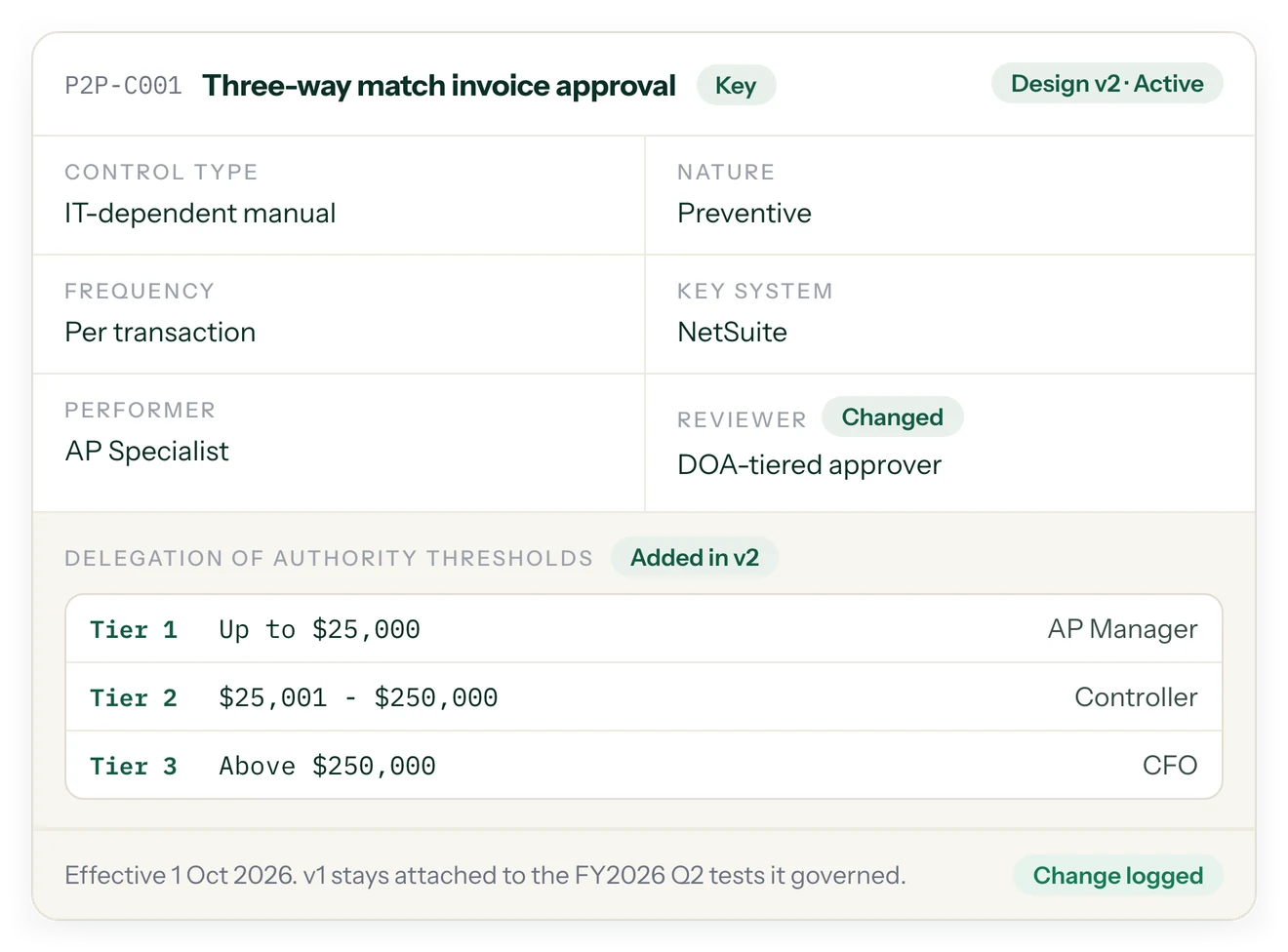
The full control design, versioned as it changes.
- Type, nature, frequency, key system, performer and reviewer
- Delegation of authority thresholds kept on the control
- A new design version is logged; the old one stays attached to the tests it governed
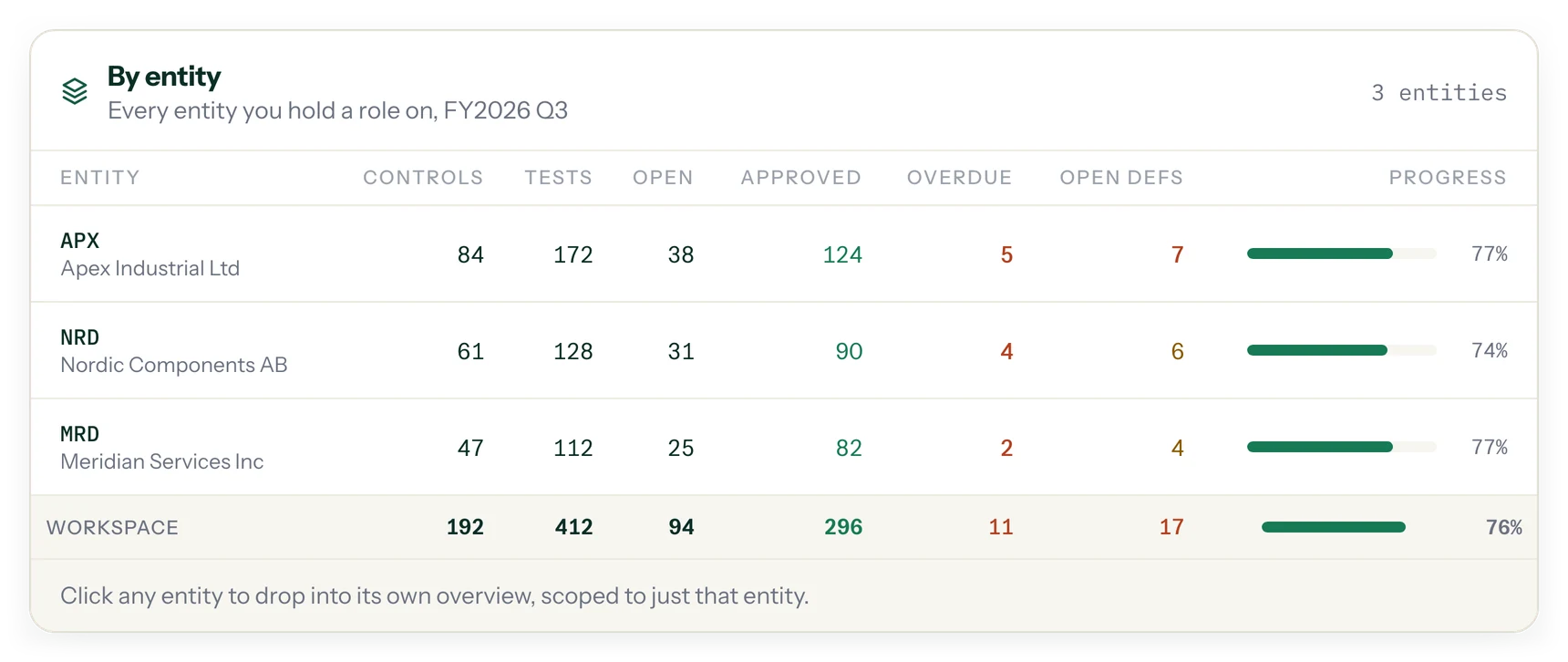
Every entity on its own, and the whole company on top.
- Each legal entity has its own RCM, tests and deficiency log, and its own people and roles
- A cross-entity dashboard for the program as a whole
Plans that fill themselves in.
- Suggested interim and roll-forward plans, one click to create
- Sample sizes, due dates and preparers filled in automatically
- A working calendar with company holidays and per-entity overrides
TEST
A guided flow from population to submission.
Every test follows the same path: Population, Sampling, Evidence, Test attributes, Conclude and submit, Review, Approve. Reusable, versioned templates define what "pass" means, so the same definition applies every time a control is tested.
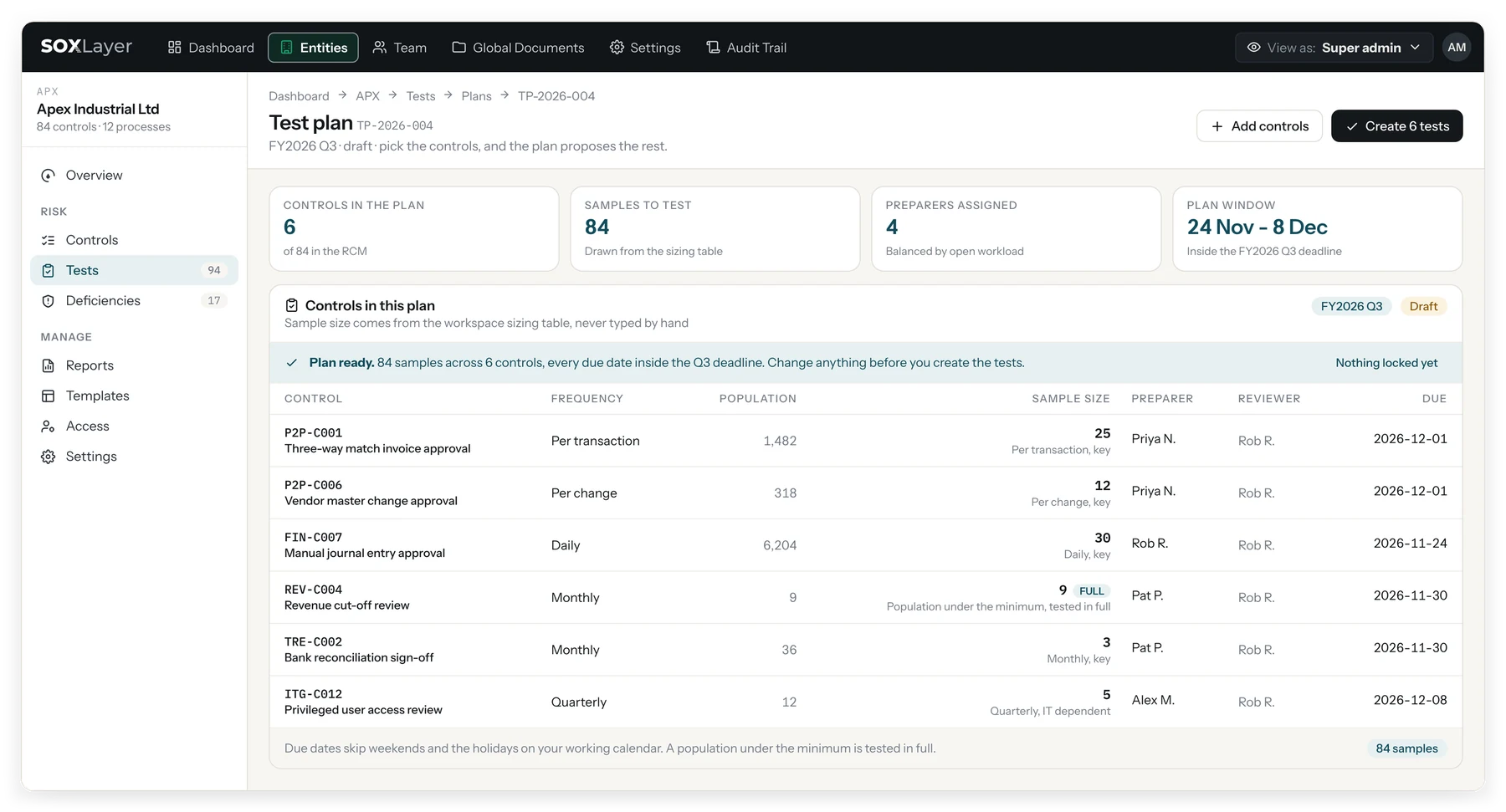
The population is totalled and fingerprinted before anyone touches it.
- CSV or Excel; blank rows are skipped and counted
- Rows, currency total and a SHA-256 fingerprint computed over the file as received
- Re-hash the file at any time and get the same fingerprint
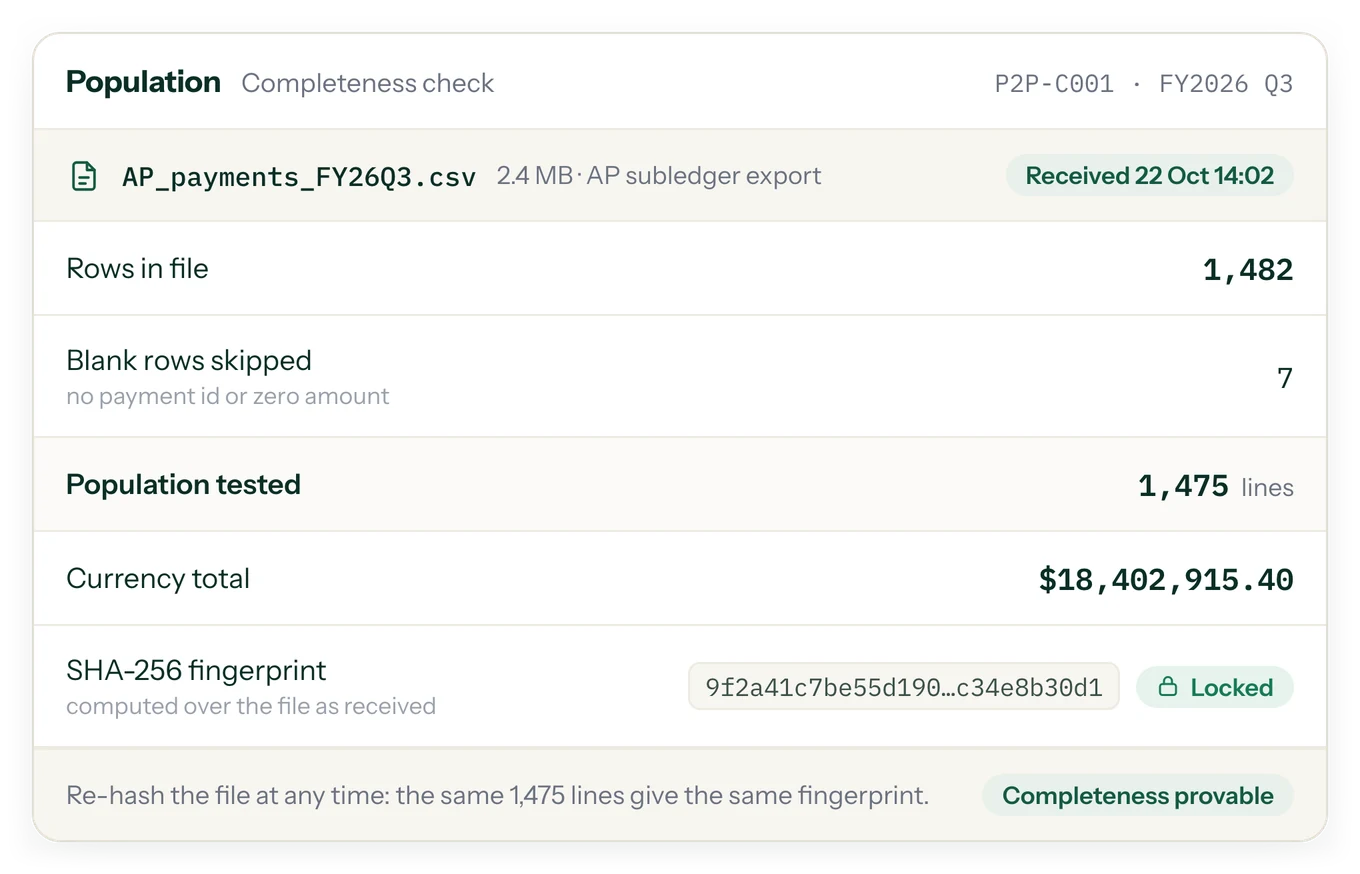
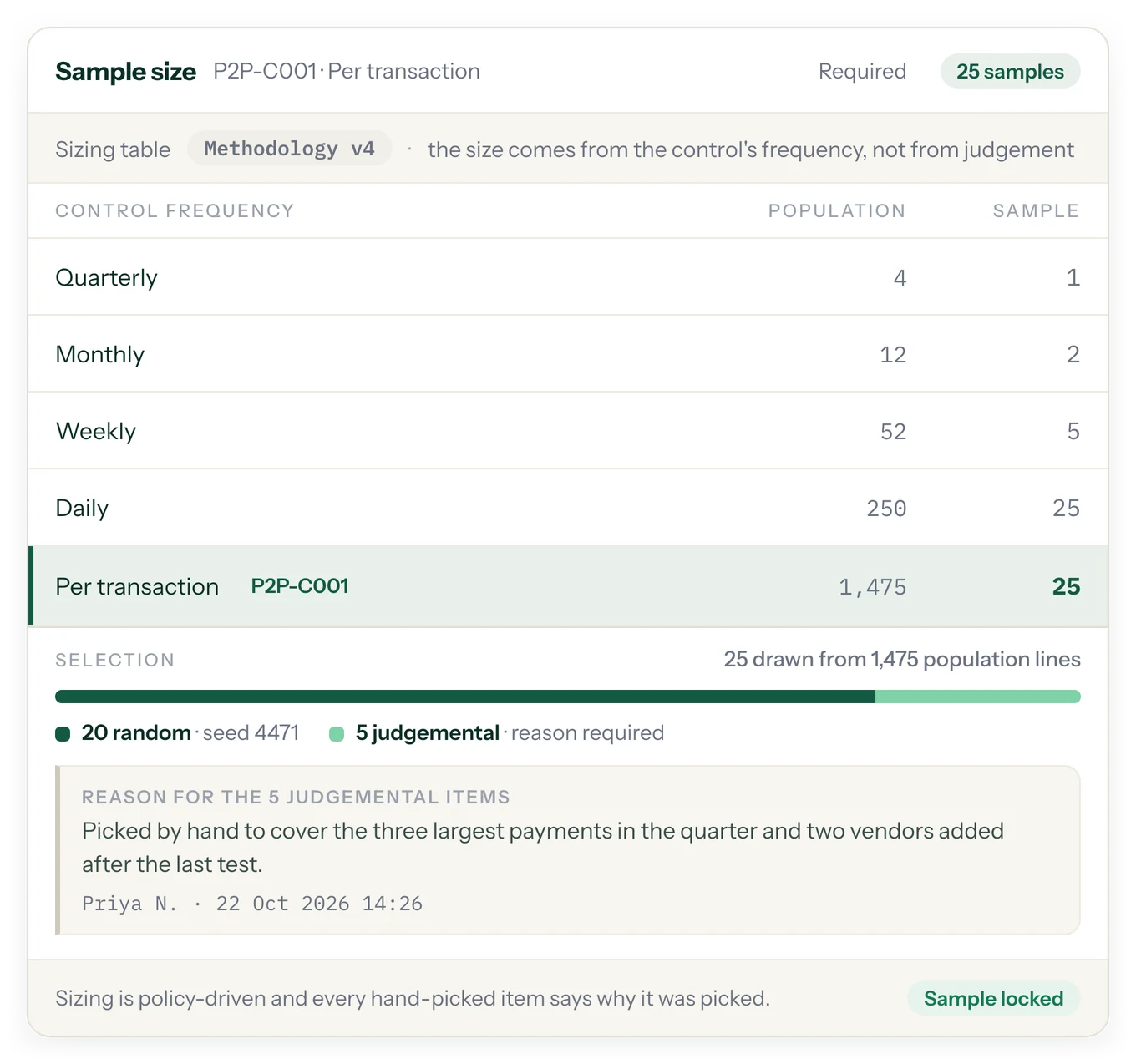
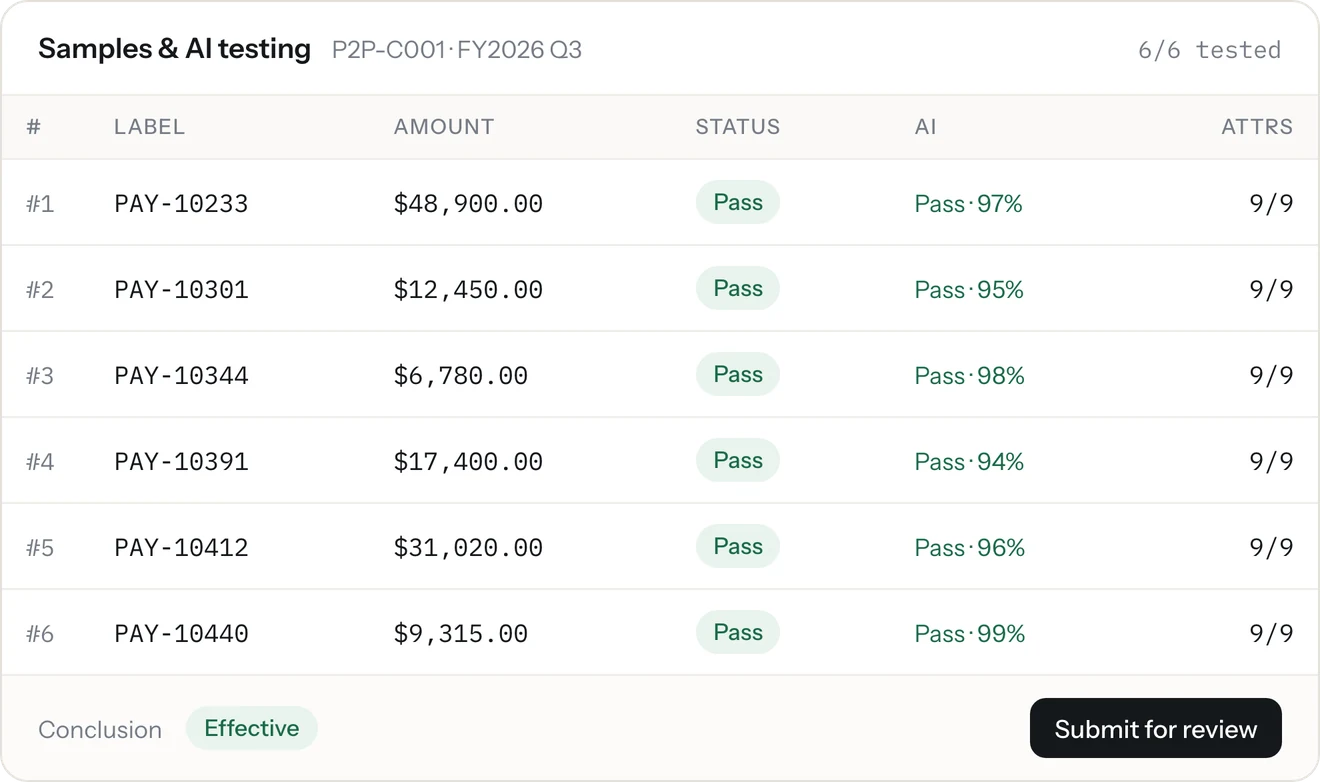
Sample sizes come from policy, and every hand-picked item says why.
- Size set by the control's frequency and your sizing table
- Random draws keep their seed
- Judgemental picks require a written reason
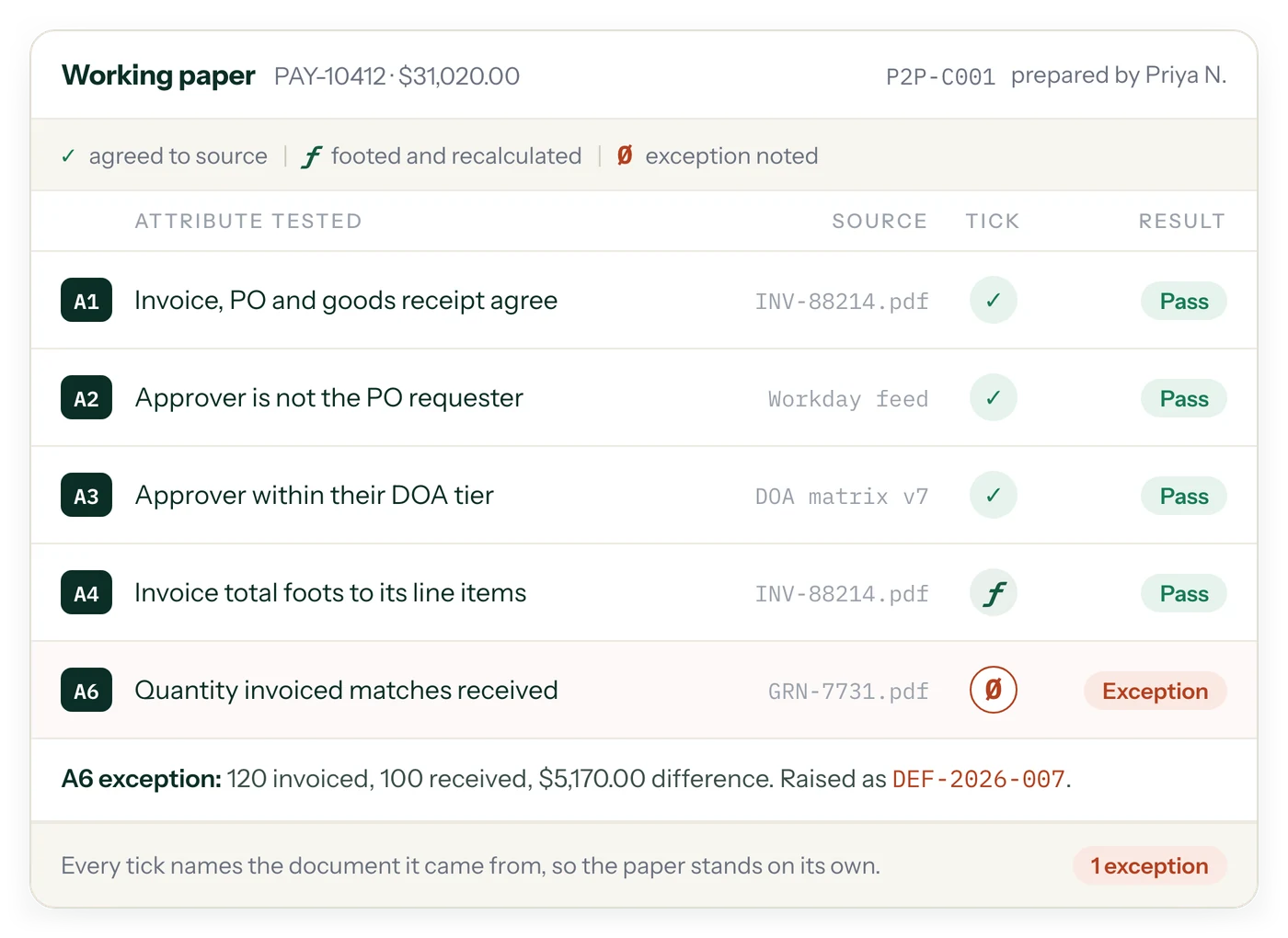
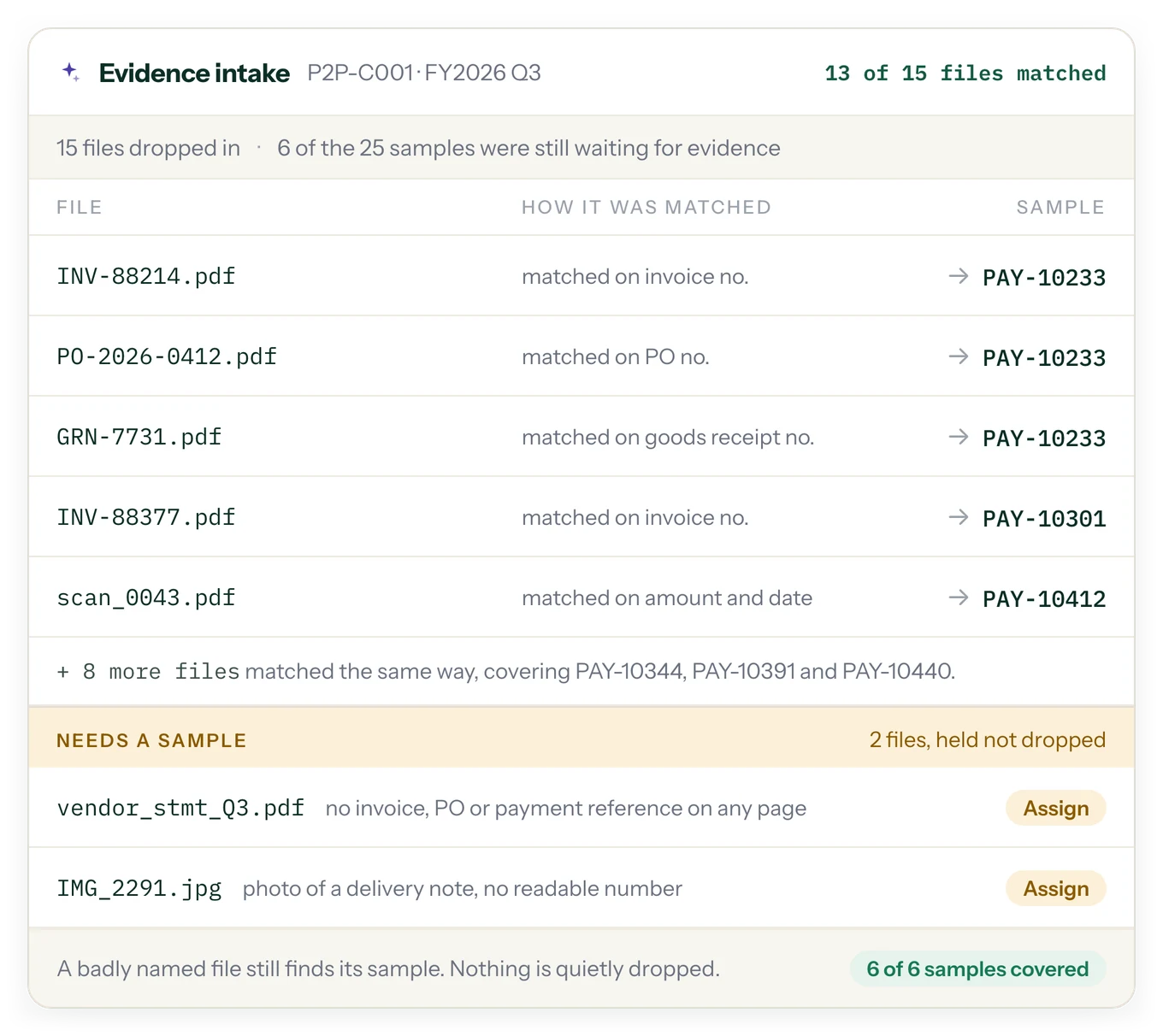
Every tick names the document it came from.
- Agreed to source, footed and recalculated, or exception noted, on every attribute
- Each attribute shows the file or feed it was tested against
- An exception raises a deficiency that records the difference, for example a 4-unit quantity variance, and links back to the sample
AI
The first pass, done for you, with a citation on every verdict.
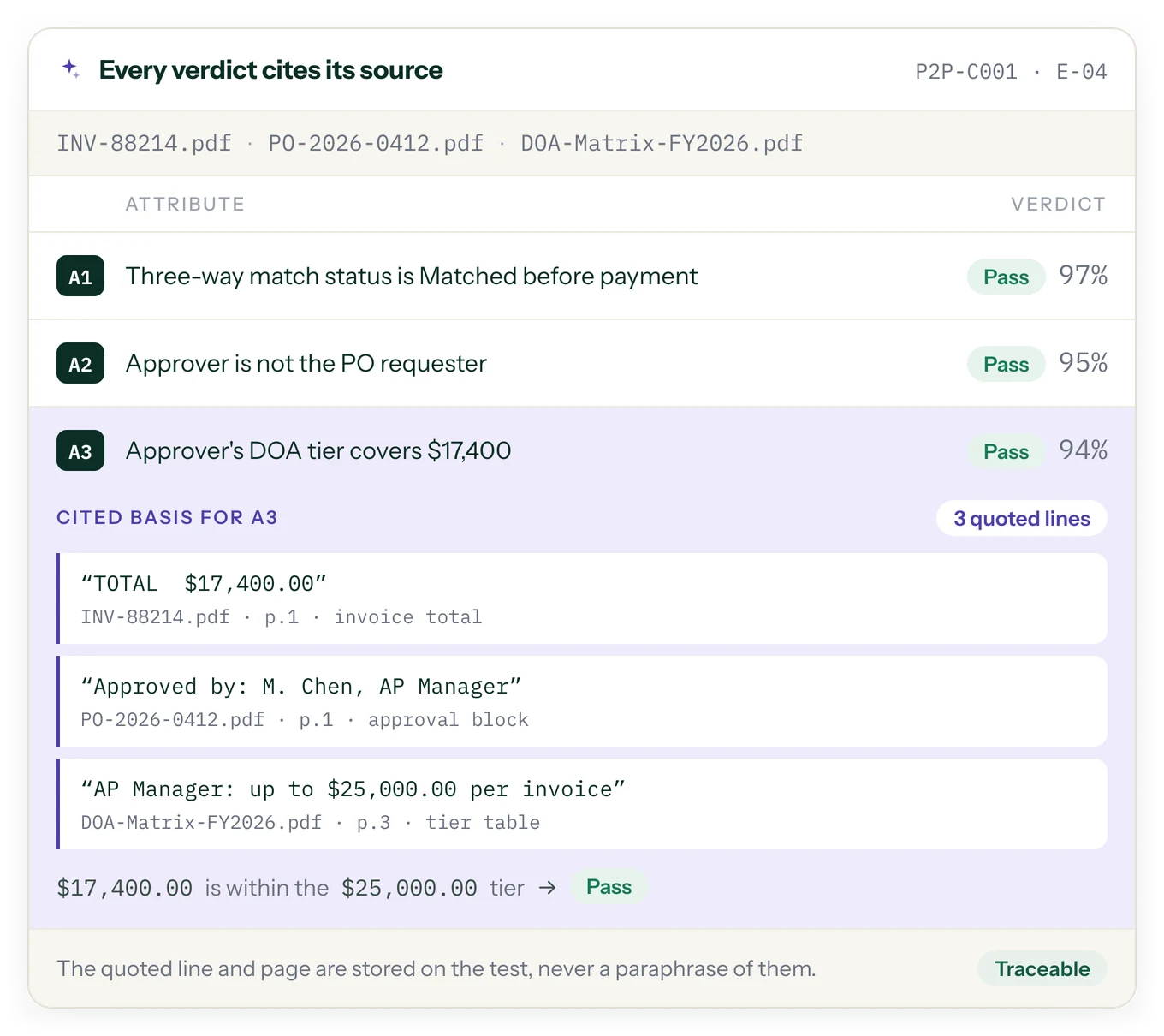
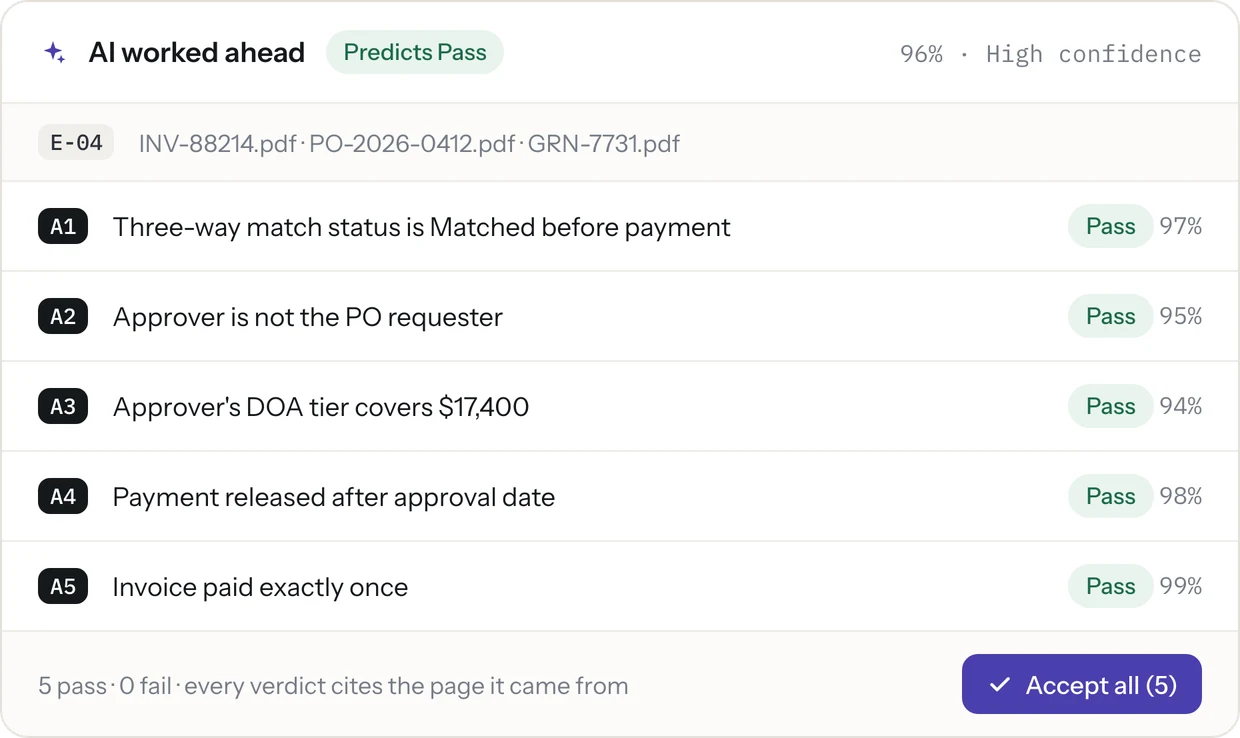
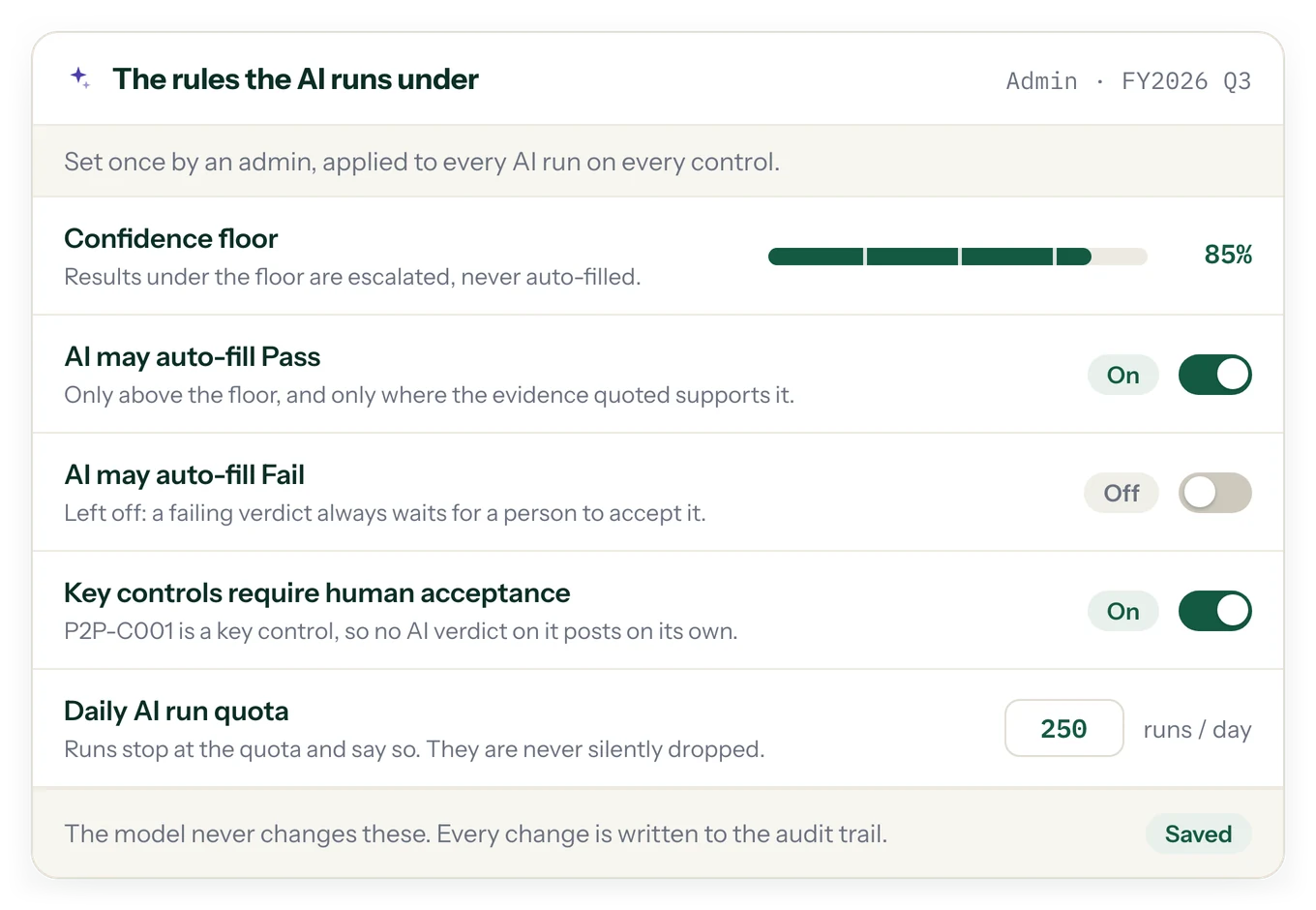
For each sample, AI reads the evidence, proposes Pass, Fail, Insufficient or N/A for every attribute, and shows the exact quote and page it relied on. People still decide: until the test is submitted they can accept, edit or override any result, auto-filled ones included, and an override needs a reason.
A verdict, a confidence score, and the line it came from.
- Every attribute gets Pass, Fail, Insufficient or N/A with the quoted line and page
- When the approval email and the ERP disagree on a date, a stronger model re-reads that attribute, and you see both readings and the reason
- Bulk-accept the high-confidence results and spend your time on the rest
REVIEW
Preparer, reviewer, approver, with segregation built in.
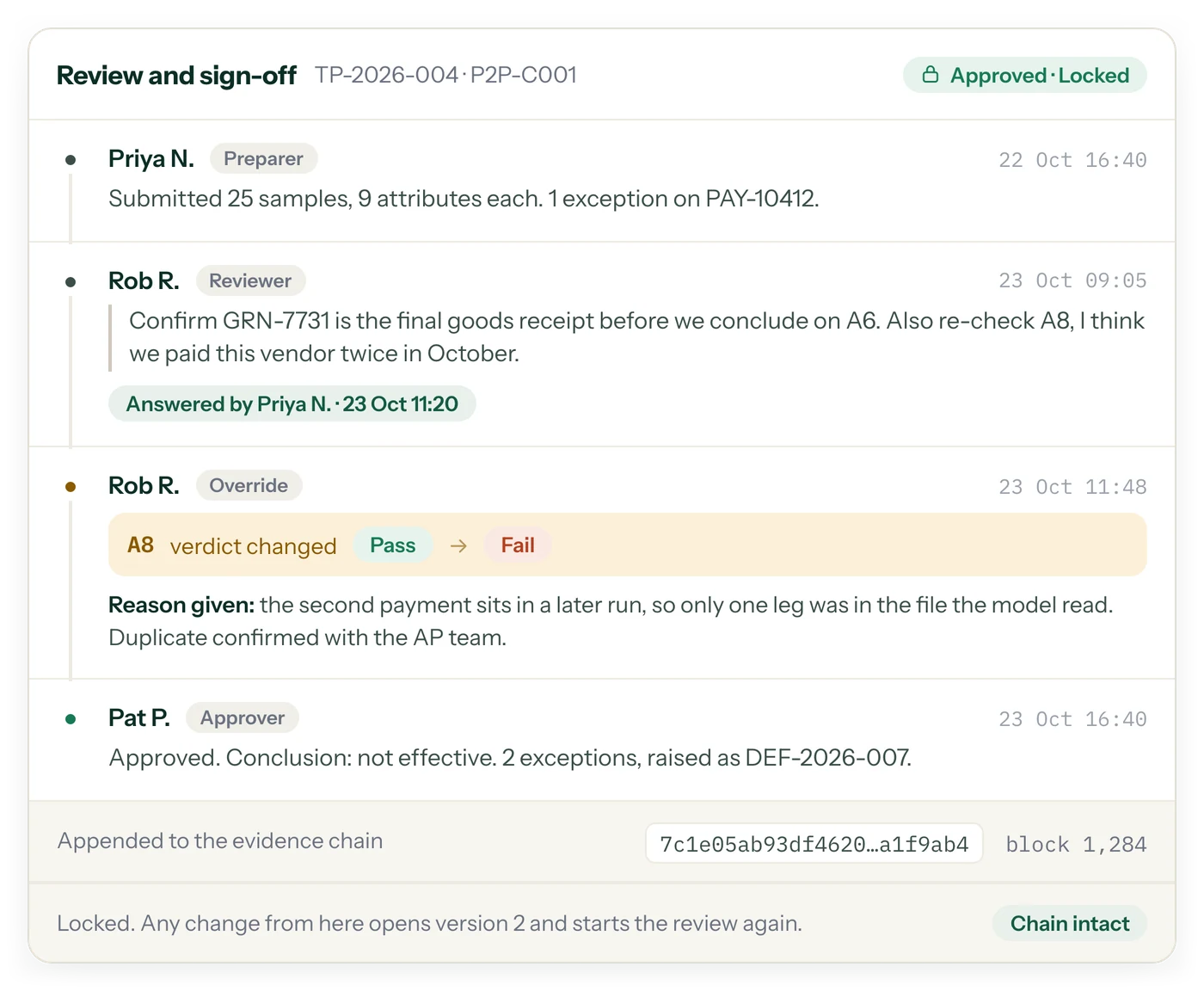
Review rounds carry ticked results and comments, and once approved a test locks. If the same person would hold conflicting roles, SOXLayer warns live rather than letting it slip through.
Comments stay on the test, not in email.
- Segregation-of-duties checks warn live during assignment
- An override records the old verdict, the new one and the reason given
- Approved tests lock; any change opens a new version and starts review again
DEFICIENCIES
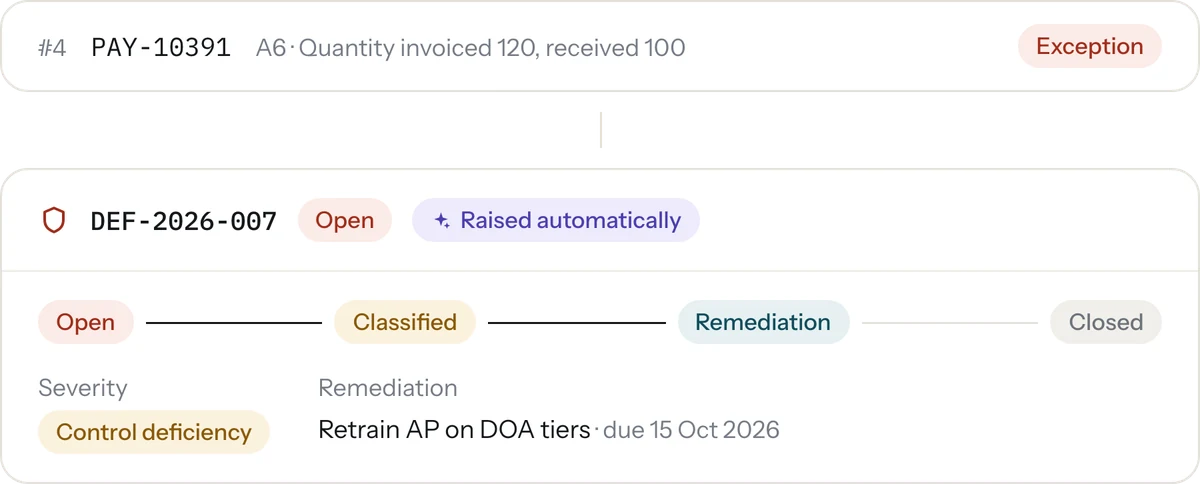
Exceptions become deficiencies, automatically linked.
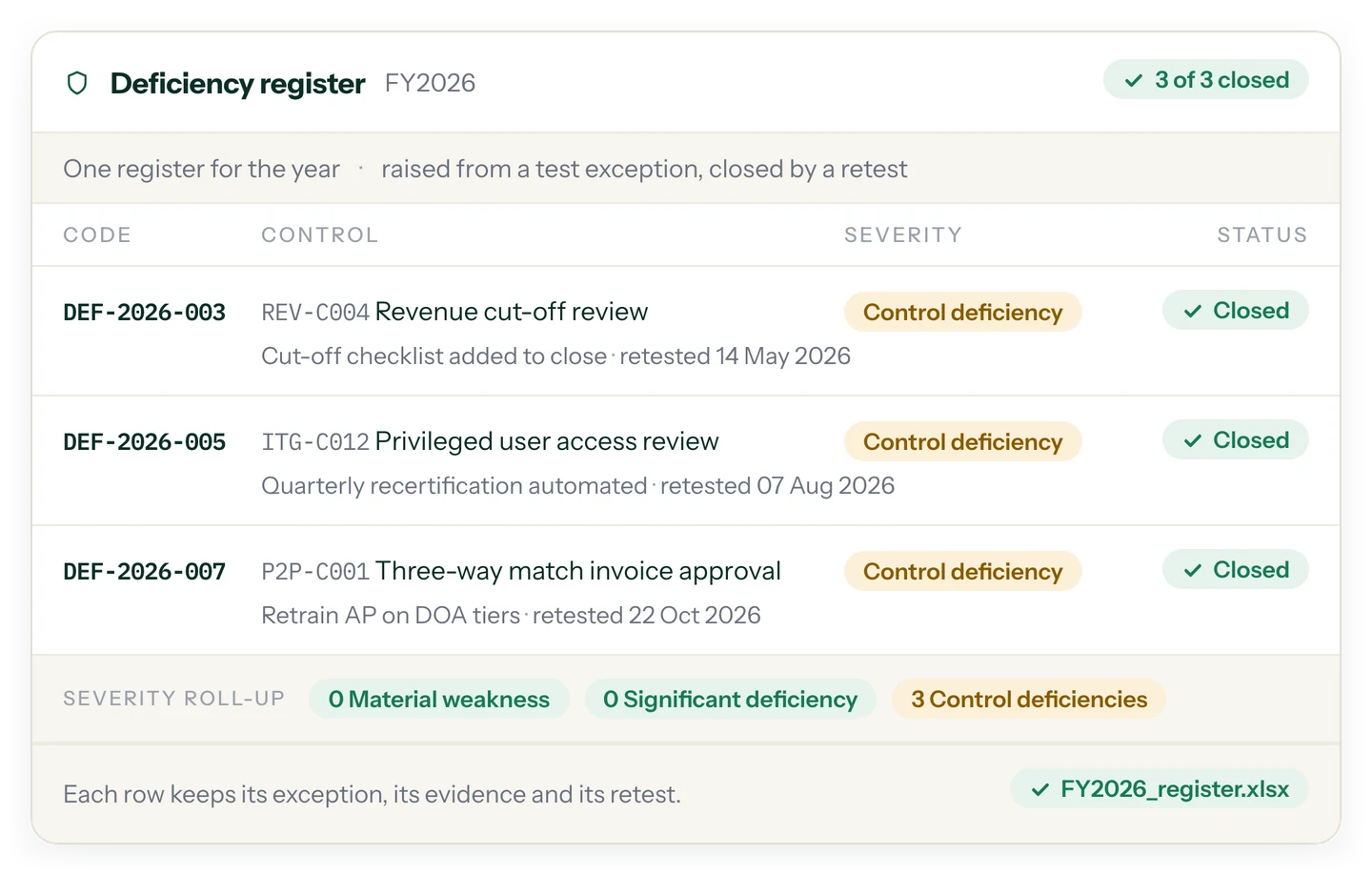
A sample marked as an exception raises a deficiency automatically, linked back to the test and samples, with severity, root cause, remediation and a clear lifecycle.
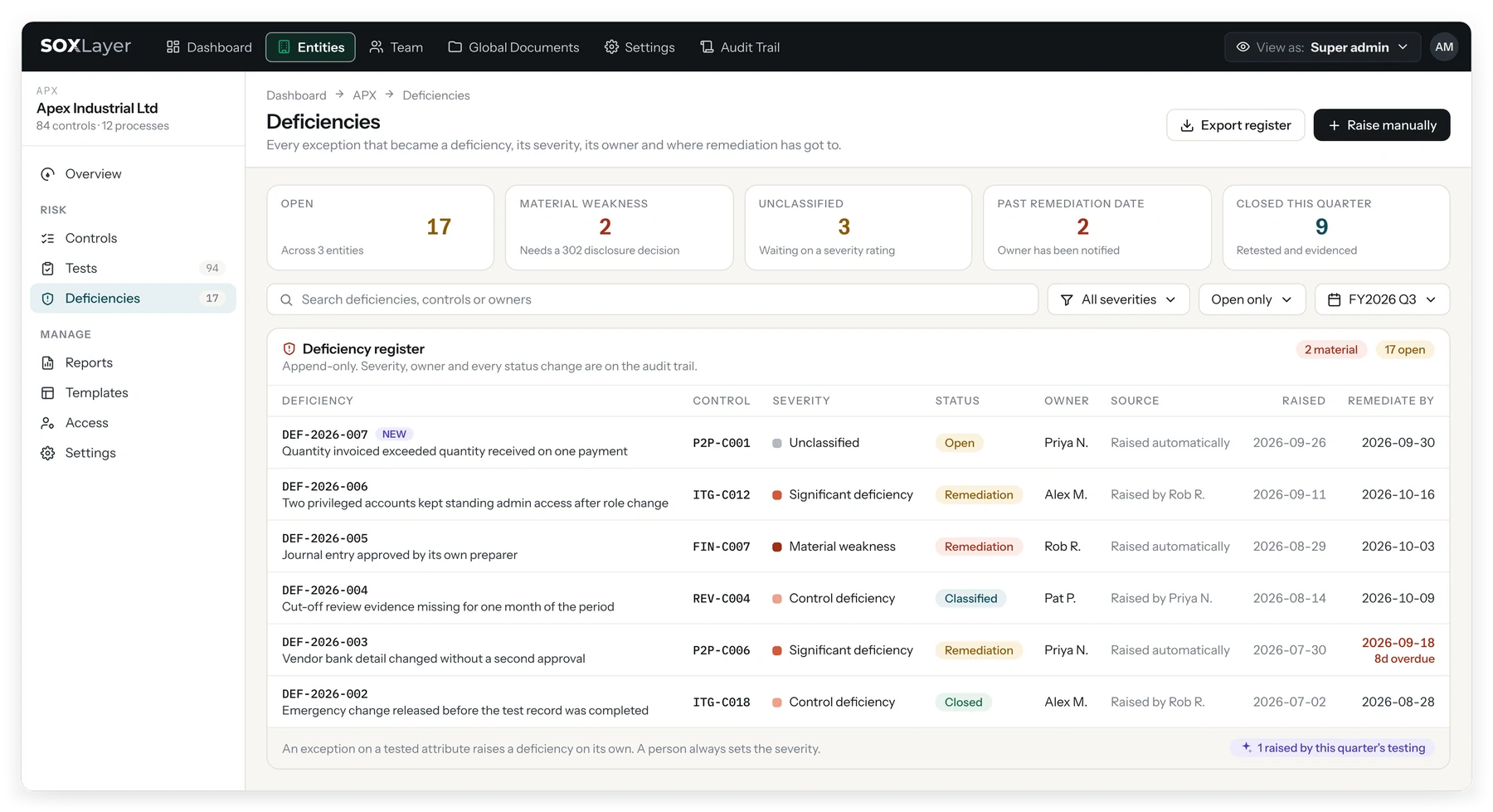
Open, Classified, Remediation, Awaiting retest, Closed.
- Severity: control deficiency, significant deficiency, or material weakness
- Root cause, remediation items with due dates, and retesting
- Linked to the sample that raised it, for the whole lifecycle
DOCUMENTS
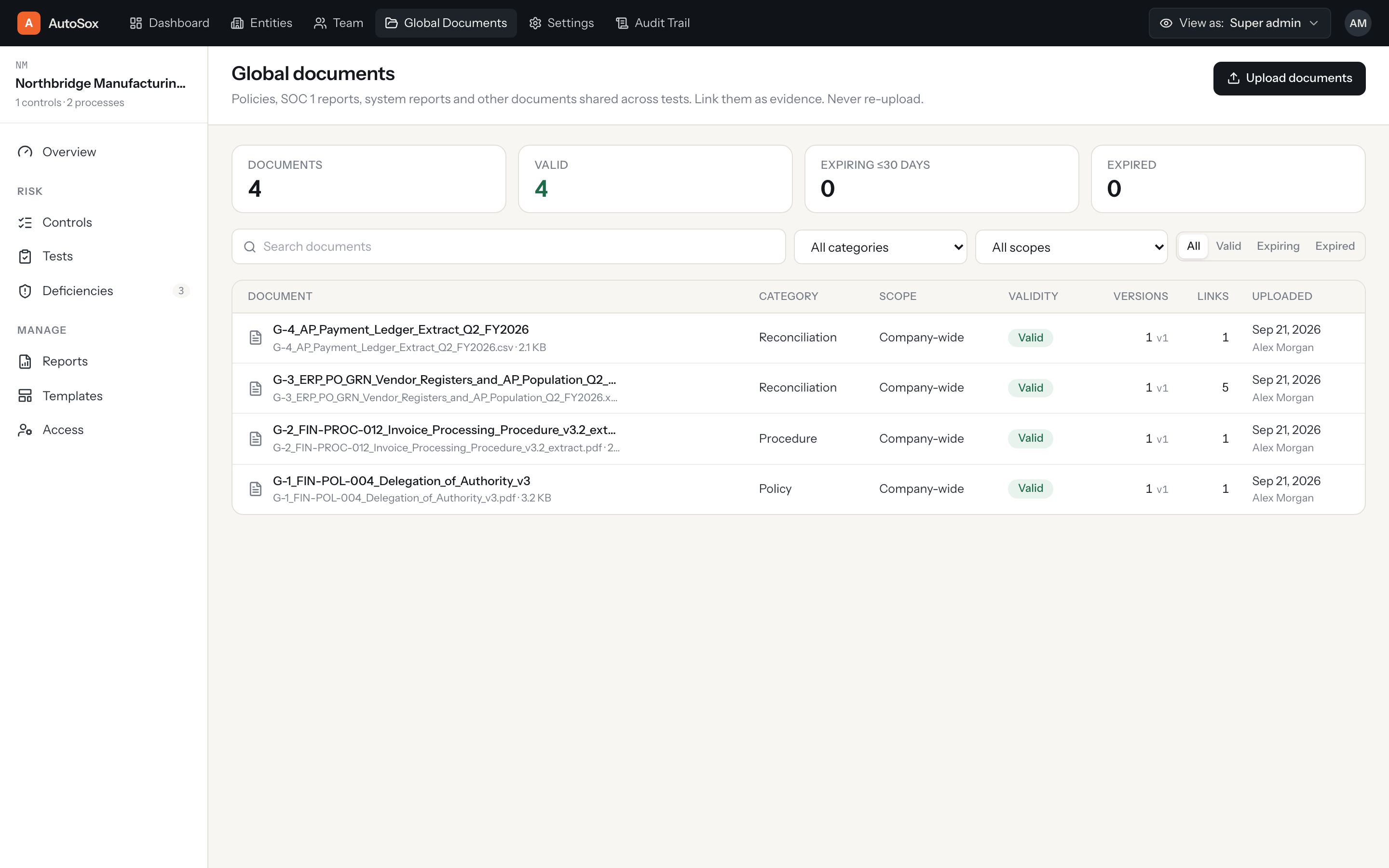
Global documents, tracked and linked to the controls that use them.
Policies, procedures and reconciliations live in one library, with validity and expiry tracking, versioning, and links back to every control that relies on them.
Always know which version was tested against.
- Validity and expiry tracking on every document
- Versioning, so the tested copy is never in doubt
- Linked to the controls that reference them
AUDIT TRAIL
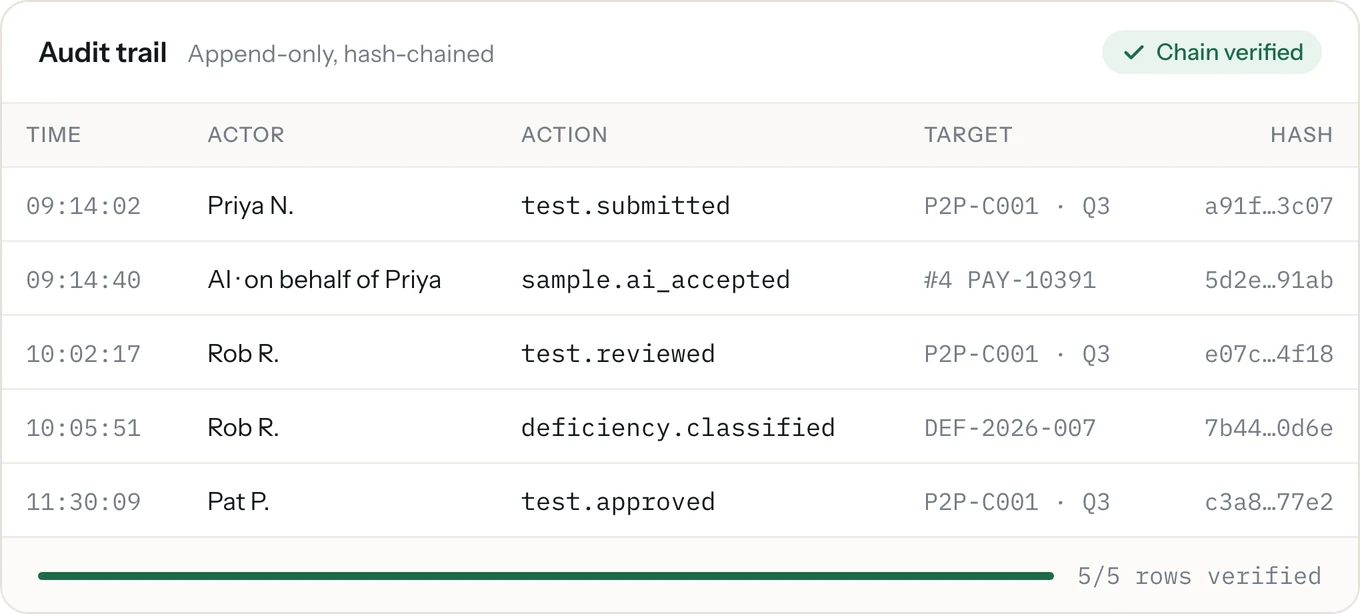
Every change, written down and checkable.
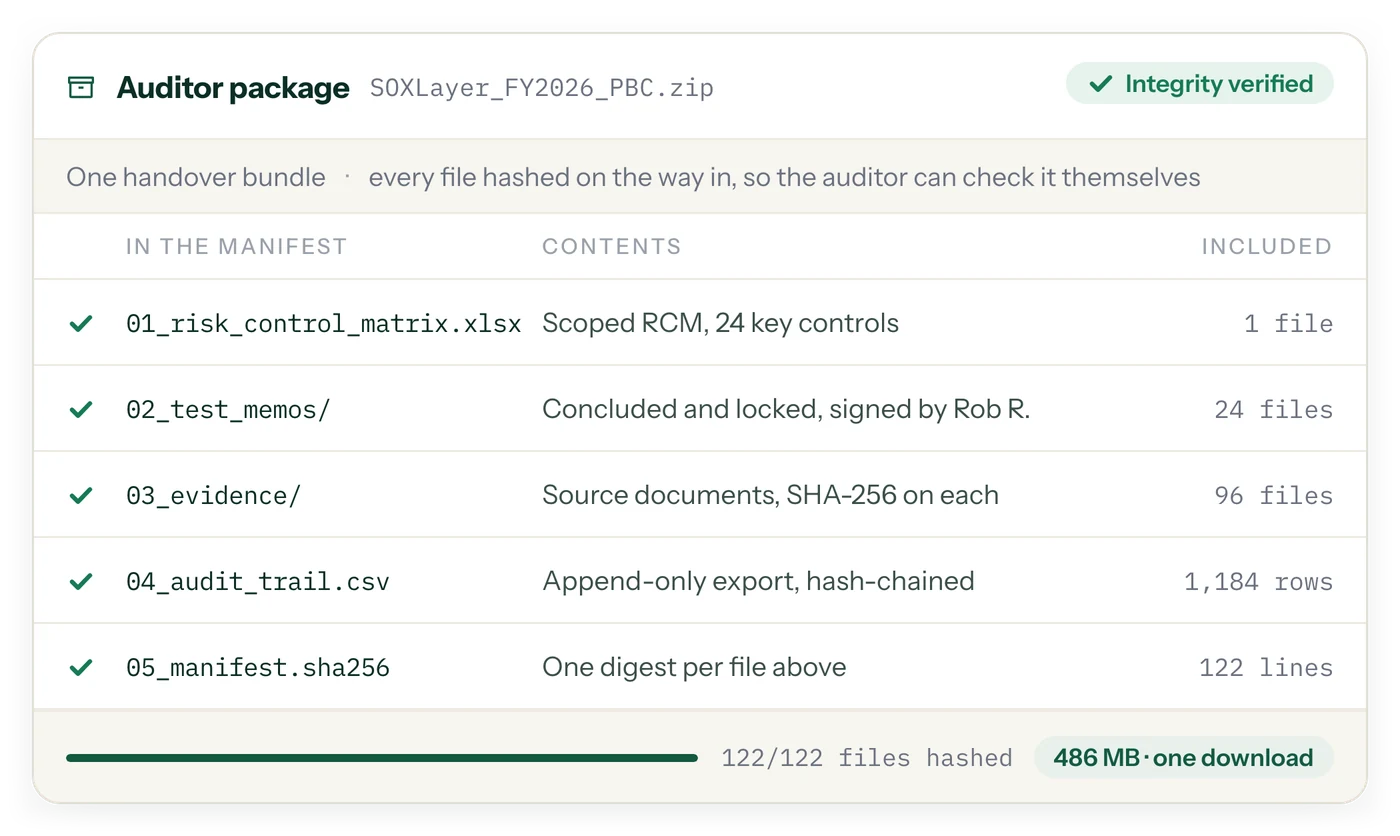
Every change is written to an append-only log: who, what, when, the value before and after, and the reason. Each row carries the hash of the one before it, so a later edit breaks the chain and the one-click check shows it. Filter it, and export it as CSV or JSON.
Verify the whole chain in one click, by you or by your client.
- Who, what, when, before and after, and the reason for the change
- Filter by entity, actor, action and date; export CSV or JSON
- "Verify integrity" checks every hash against the last
REPORTS
Year-end reporting read from the record, not re-typed into a slide.
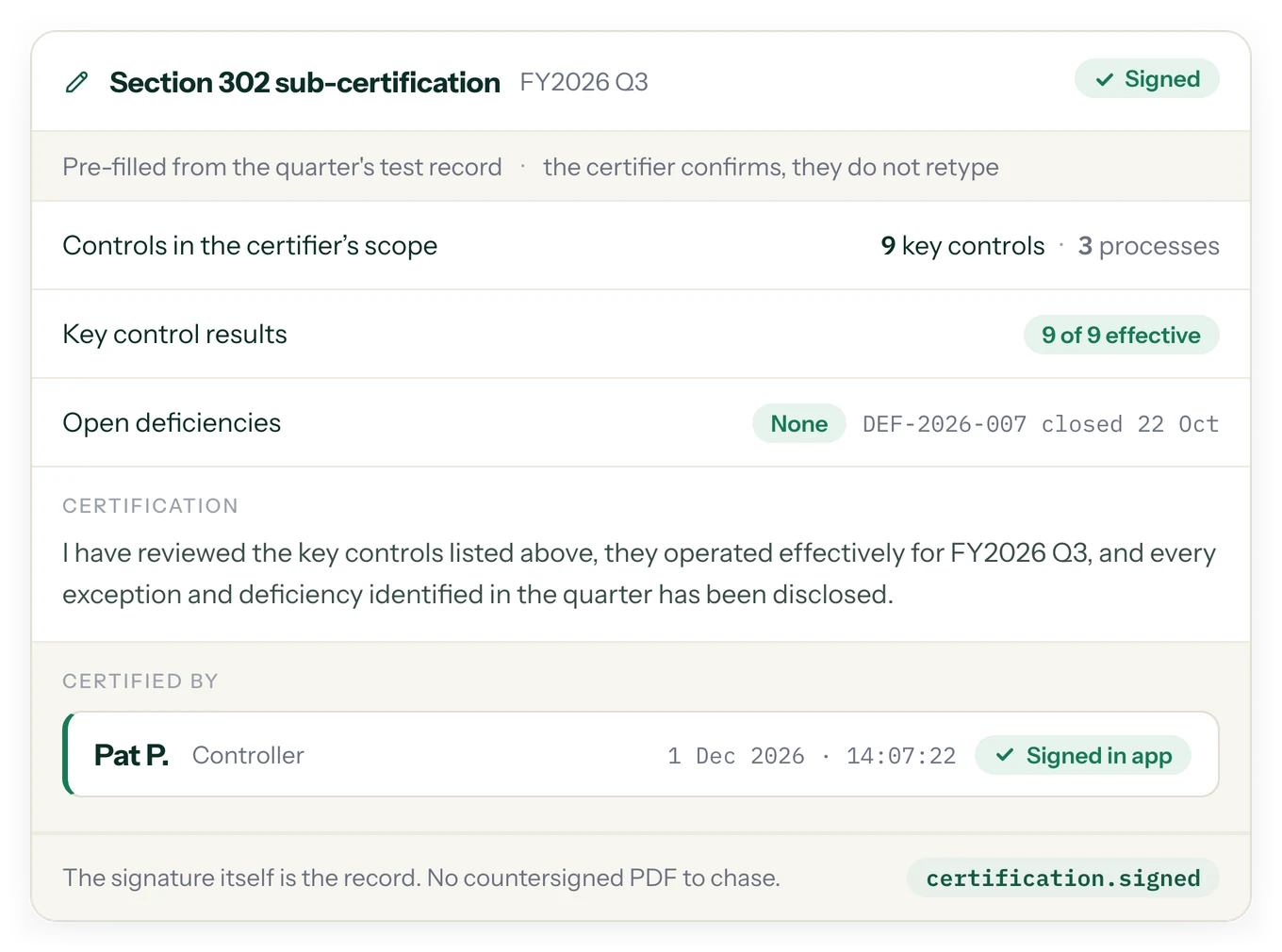
The year-end pack, the Section 404 management narrative and Section 302 sub-certifications are built from the live test record. Every figure opens the test, plan or deficiency it was read from.
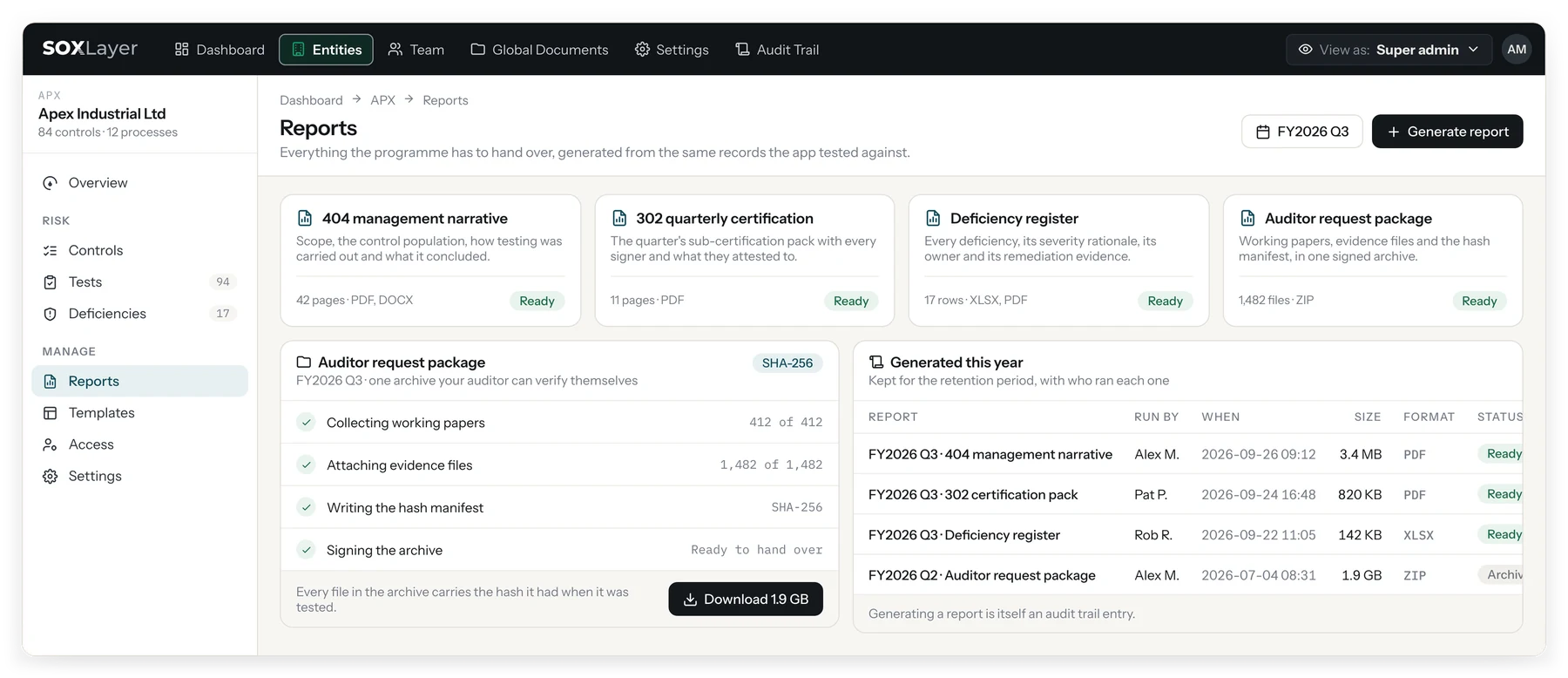
Controls in scope, tests concluded, coverage and the ICFR conclusion, in one pack.
- Every figure is read from the live record, never re-keyed
- Deficiency roll-up by severity, with closure status
- A drafted ICFR conclusion, exported as PDF and spreadsheet
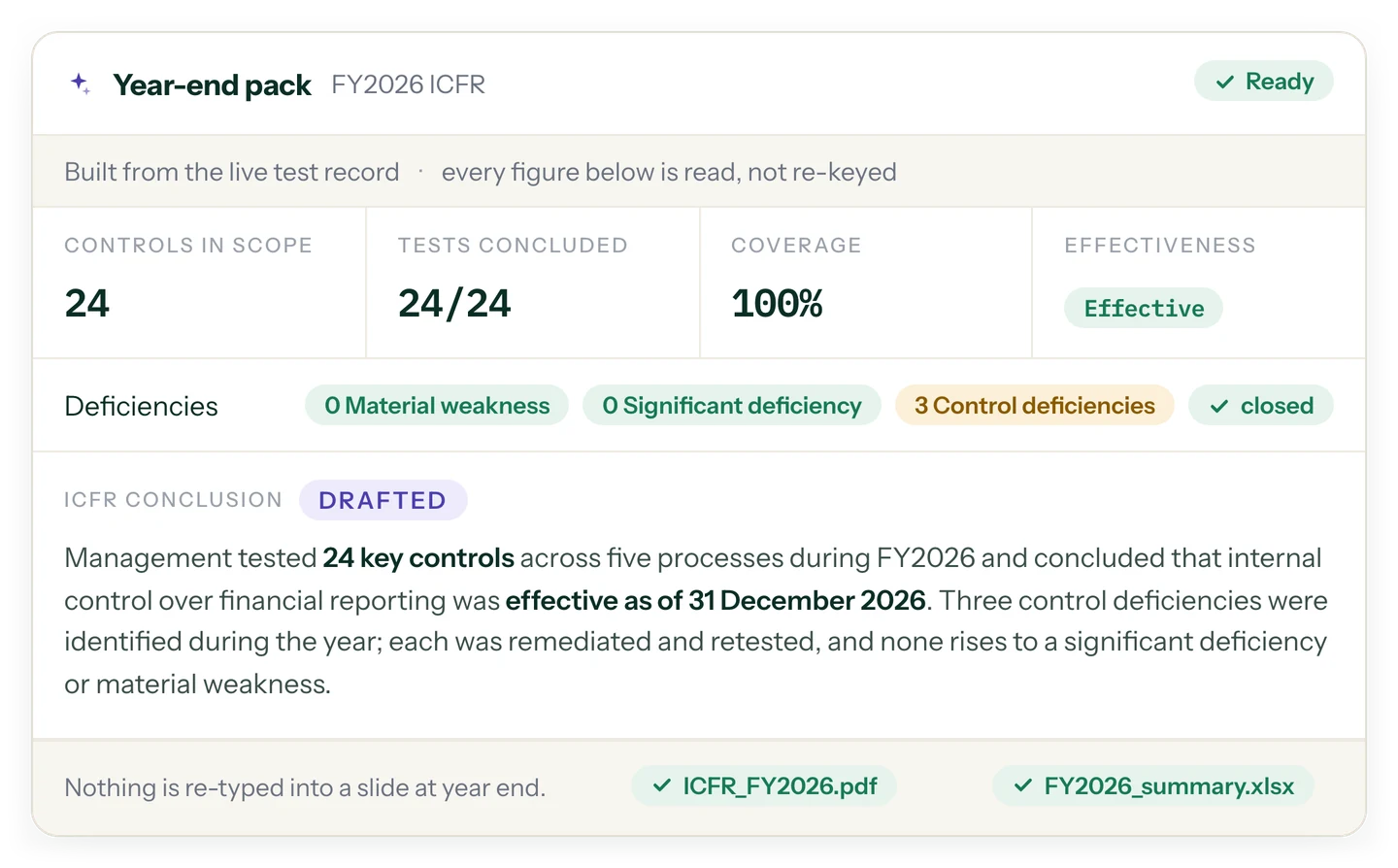
A management narrative where every number cites a system fact.
- A sentence carrying a number cites a test, plan or register, or it is not written
- Claims with no supporting fact are dropped from the draft and shown as dropped
- Every figure in the narrative opens the record it was read from
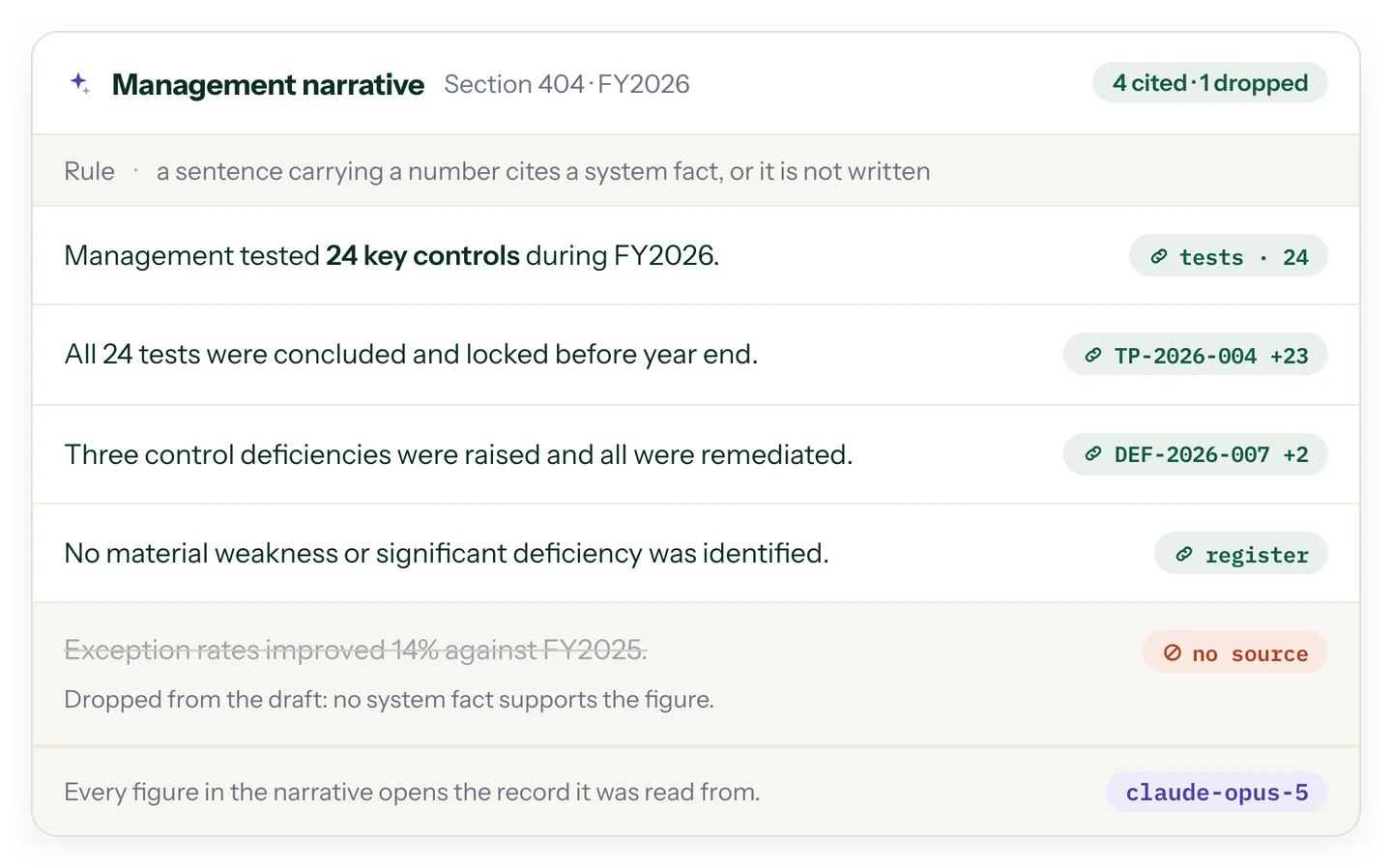
Pre-filled from the quarter's record. The certifier confirms, they do not retype.
- Controls in the certifier's scope, key control results and open deficiencies filled in
- Signed in the app, with the signature itself as the record
- No countersigned PDF to chase
ACCESS
Invite people, scope them per entity, and see what they see.
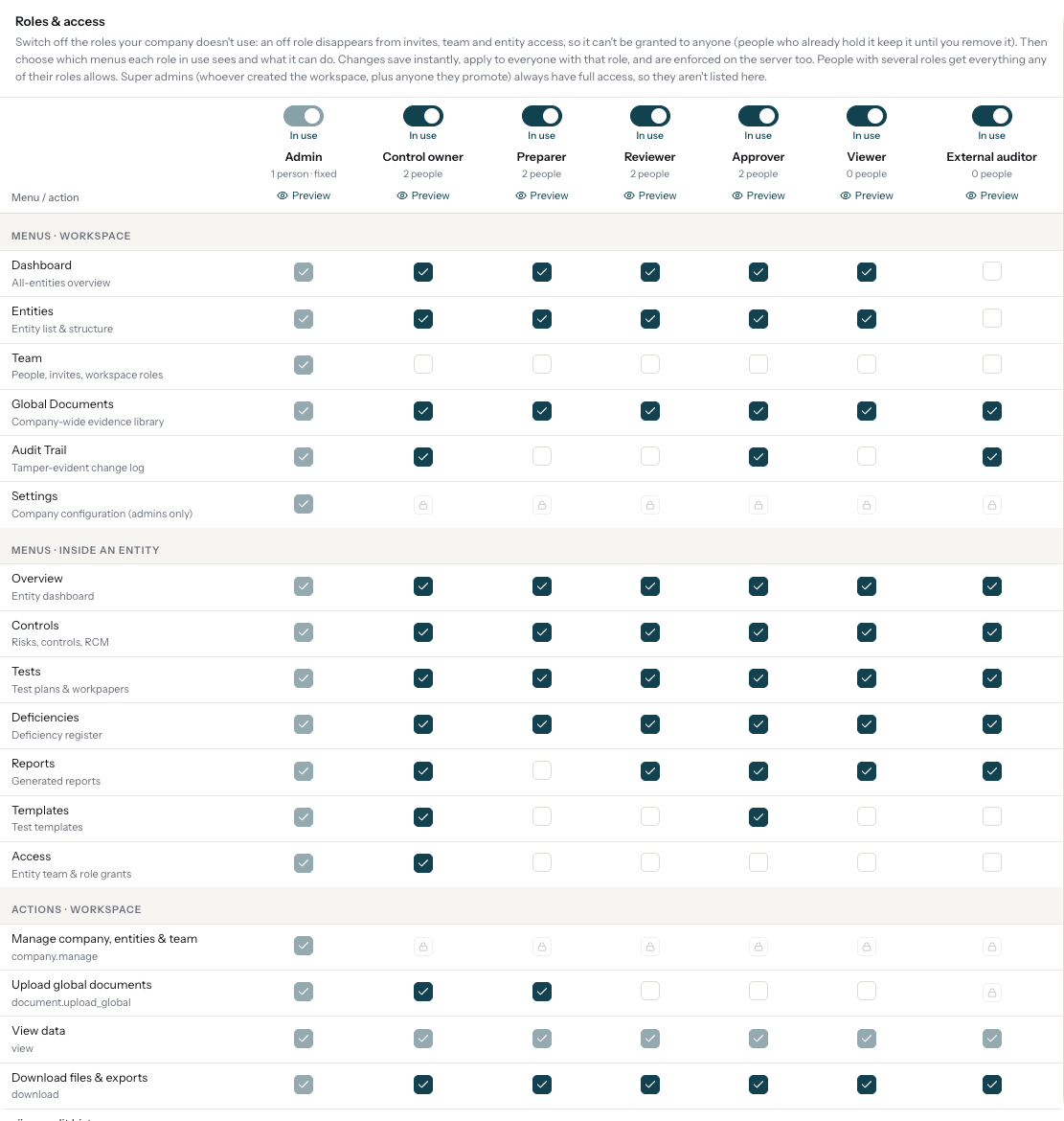
Roles are admin, control owner, preparer, reviewer, approver, viewer and external auditor. Viewers and external auditors never get write access, and super admins can "View as" any role or person.
Every menu and action, decided per role.
- Per-role menus and capabilities, and roles can be switched off
- "View as" any role or person
- MFA policy: admins and approvers without MFA are flagged
SETTINGS
Company settings that match how your team already works.
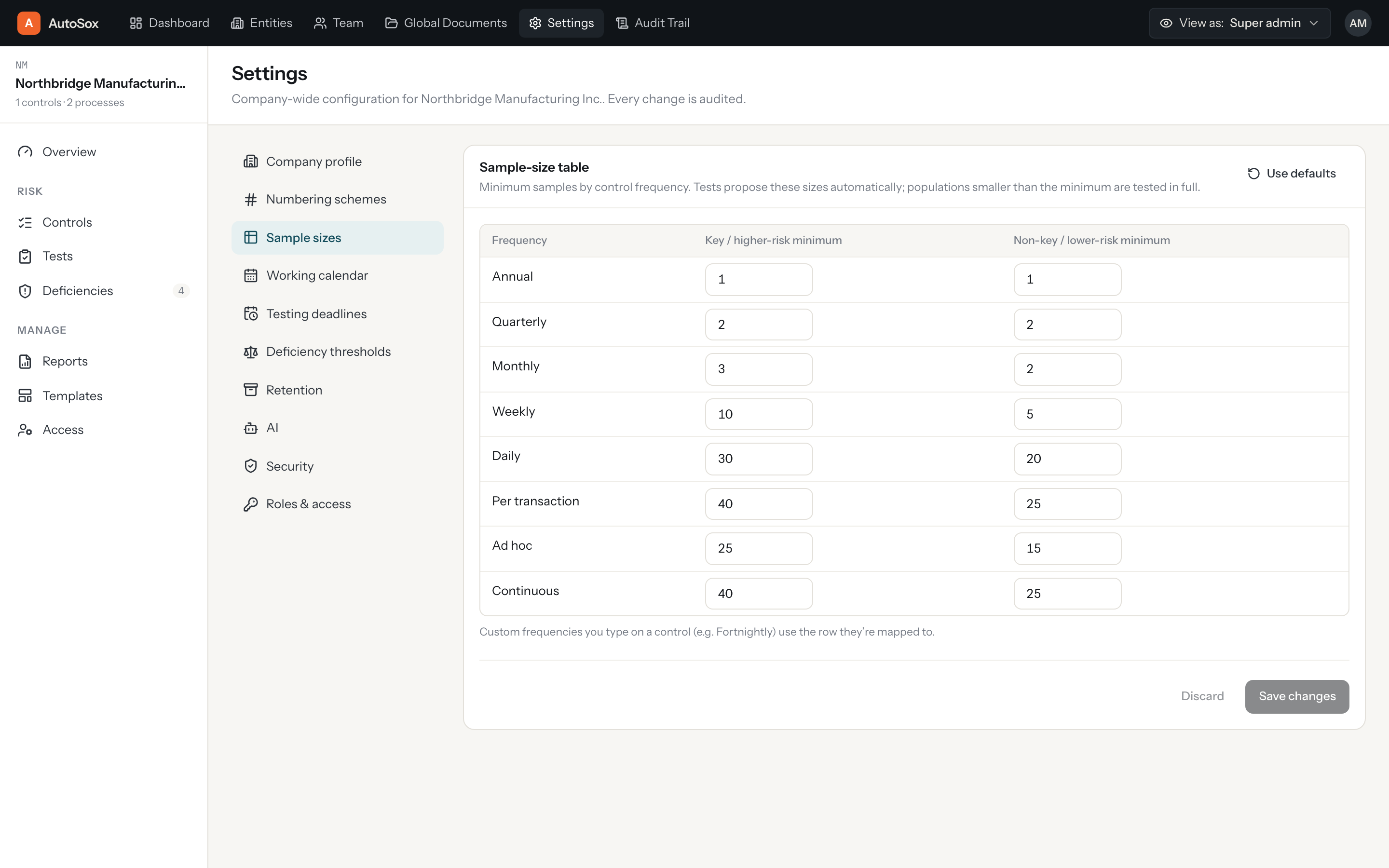
Numbering schemes, sample-size tables per frequency, testing deadlines, deficiency thresholds, data retention and security all live in company settings. Sign-in is Google or work email.
Your sample sizes, your numbering, your deadlines.
- Your own sample-size table by control frequency
- Numbering schemes for controls, tests and deficiencies
- Google sign-in or work email
SOX SOFTWARE
Streamline SOX Compliance with Connected Control Testing
SOXLayer brings control documentation, testing, evidence, reviews, deficiencies and reporting together in one workspace, helping teams manage a more consistent and traceable SOX compliance process.
What is SOX software?
SOX software helps organizations document, evaluate and monitor internal controls related to financial reporting under the Sarbanes-Oxley Act. Instead of managing control descriptions, sample selections, supporting evidence, reviewer comments and testing conclusions across disconnected spreadsheets and email threads, teams can coordinate their work in one structured environment.
Effective control testing requires more than recording whether a control passed or failed. Teams need to establish the population being tested, select appropriate samples, inspect supporting documents, evaluate control attributes, explain exceptions and retain evidence supporting each conclusion. A consistent workflow makes these steps easier to follow and helps reviewers understand how testing decisions were reached.
SOXLayer connects these activities from planning through approval. Control owners, preparers, reviewers and approvers can work within their assigned roles while keeping testing results, supporting documents and relevant changes linked to the underlying control.
Build a Reliable Risk and Control Matrix
A well-maintained risk and control matrix is an important starting point for a SOX testing program. It connects financial reporting risks with the controls designed to address them and helps teams understand which processes, systems and control owners fall within the scope of testing.
SOXLayer organizes controls by process and supports control attributes such as frequency, type, key-control status, performer, reviewer and relevant system information. Risks can be mapped to the controls that address them, making gaps in coverage easier to identify before testing begins.
Organizations operating across multiple legal entities can maintain separate controls, processes, tests and deficiencies for each entity while using a consolidated view to understand program-wide progress. This structure helps teams coordinate testing without losing the context of individual entities.
Planning also involves assigning preparers and reviewers, setting deadlines and determining sample sizes. SOXLayer supports interim and roll-forward planning, with suggested due dates, sample sizes and assignments based on configured company settings. Teams can then review and adapt the proposed plan to fit their own compliance requirements.
Make Control Testing More Consistent and Traceable
Consistent testing depends on having a clear record of the population, sampling method, evidence reviewed and attributes evaluated. When these details are stored separately, it can become difficult to demonstrate how a sample was selected or which source document supported a particular conclusion.
SOXLayer supports CSV and Excel population uploads and records population details such as row counts, skipped blank rows, currency totals where applicable and a SHA-256 fingerprint of the received file. These details help teams identify the population used during testing and support later verification of the original file.
Sample sizes can be determined using company-defined tables based on control frequency. Random selections retain their seed, while judgemental selections require a written reason. This creates a clearer record of how the sample was chosen and gives reviewers useful context when evaluating the testing approach.
During testing, preparers can document whether an attribute was agreed to source, footed or recalculated, or identified as an exception. Each attribute can reference the relevant file or feed. If a result identifies a potential exception, the related deficiency can be linked to the sample and its supporting evidence rather than being recorded as an unrelated item.
Use AI Assistance Without Removing Human Oversight
Reviewing supporting evidence can take significant time, particularly when a testing program includes many samples and different types of documentation. AI-assisted control testing can help teams examine evidence and prepare an initial assessment, allowing professionals to focus their attention on complex items, conflicting information and exceptions.
SOXLayer's AI-assisted workflow proposes Pass, Fail, Insufficient or N/A for individual testing attributes and presents the quoted evidence and page used to support the proposed verdict. When the available documentation does not provide enough information, the result can indicate that further evidence or review is needed.
AI assistance is not a replacement for professional judgement. A designated person remains responsible for accepting, editing or overriding a proposed result. Overrides include a reason, helping preserve the context behind the final decision. Where evidence sources disagree, users can examine the competing readings instead of relying on an unexplained automated conclusion.
This approach combines the efficiency of an AI-assisted first pass with human review, documented reasoning and a clearer connection between testing conclusions and source evidence.
Learn more about the dedicated SOXLayer AI testing workflow and how evidence citations support the review process.
Connect Review Decisions to Remediation
A complete SOX control testing process needs defined responsibilities and a clear approval history. Preparers document their work, reviewers evaluate the results, and authorized approvers sign off on completed tests. Segregation-of-duties checks help identify conflicting role assignments, while review comments remain associated with the test instead of being scattered across email conversations.
Once a test is approved, SOXLayer locks the approved version. Subsequent changes create a new version and initiate review again, helping distinguish the originally approved record from later updates.
Testing exceptions also need a structured path to resolution. SOXLayer can link deficiencies to the tests and samples that identified them and track details such as severity, root cause, remediation actions, owners, due dates and retesting. Teams can follow a deficiency through its lifecycle, from identification and classification to remediation and closure.
Maintaining these relationships helps control owners and reviewers understand why an issue was raised, what action is required and whether the remediation process has progressed. It also reduces the need to manually recreate the same information in separate registers.
Maintain Evidence, Versions and a Verifiable Audit Trail
Reliable compliance documentation should make it possible to understand what changed, who made the change, when it occurred and why. SOXLayer records activity in an append-only audit log containing relevant details, including values before and after a change and the reason provided.
Each audit entry carries a hash linked to the preceding entry. The integrity verification process checks the chain, helping users identify changes that could affect the recorded sequence. Audit records can be filtered by relevant criteria and exported in CSV or JSON format for further review.
The document library supports policies, procedures, reconciliations and other materials used during control testing. Validity and expiry tracking, document versioning and links to relevant controls help teams identify which version was available for a particular test.
These capabilities support evidence traceability and documentation discipline. They do not replace an organization's own retention policies, access reviews, security procedures or independent assessment requirements; those responsibilities should continue to be managed according to the organization's applicable policies and obligations.
Explore the SOXLayer audit trail features for more information about recorded changes and integrity verification.
Prepare SOX Reports from the Testing Record
Compliance teams need to communicate testing progress, unresolved issues and control conclusions to management, internal stakeholders and auditors. Preparing these reports manually can introduce duplicated effort and inconsistencies when figures are copied from separate spreadsheets or registers.
SOXLayer's reporting capabilities use the testing record to support year-end reporting, deficiency summaries, Section 404 management narratives, Section 302 sub-certifications and auditor request packages. Figures can be traced back to the tests, plans or deficiencies from which they were obtained, helping reviewers investigate the underlying information.
Dashboards provide visibility into testing completion, overdue work, approved tests, open deficiencies and progress across entities. The difference between tests that have fallen due and tests that have been approved helps teams understand outstanding work and identify where follow-up may be necessary.
Reports should always be reviewed by the responsible professionals before they are finalized or submitted. SOXLayer helps organize and trace the underlying information, while management retains responsibility for its conclusions, certifications and compliance decisions.
Configure the Workflow Around Your Organization
SOX testing programs differ in their control structures, sample-size policies, deadlines, numbering conventions and approval responsibilities. A useful control testing platform should allow teams to configure these rules instead of forcing every organization into the same process.
SOXLayer provides company settings for sample-size tables by control frequency, numbering schemes for controls, tests and deficiencies, testing deadlines, deficiency thresholds and other program settings. Roles can be assigned according to responsibilities, with access scoped by legal entity where required.
Available roles are admin, control owner, preparer, reviewer, approver, viewer and external auditor. Read-only viewer and external auditor access helps authorized stakeholders, such as a client company or the external audit team, review relevant work without receiving write permissions. Role-based access and multifactor authentication policies can support a more structured access management process.
By connecting planning, evidence, testing, review, remediation and reporting, SOXLayer helps teams reduce fragmented documentation and maintain a clearer record of the control testing lifecycle. Organizations can use this connected workflow to improve visibility, support repeatable procedures and make it easier to explain how testing conclusions were reached.
Bring Your SOX Control Testing Process into One Workspace
Whether your team is preparing an interim testing plan, evaluating evidence for a key control, reviewing a deficiency or assembling year-end reporting, a connected workflow can make the work easier to follow. SOXLayer brings these activities together while preserving the links between the control, sample, evidence, review decision and final record.
Teams can begin by reviewing their risk and control matrix, configuring testing policies and assigning responsibilities. They can then build a testing plan, upload population data, select samples, attach evidence and move each test through preparation, review and approval. Exceptions can be tracked through remediation, while reporting and audit history provide additional visibility into the work performed.
The result is a more organized approach to SOX control testing, with AI-assisted evidence assessment, human oversight, configurable workflows and traceable records in one platform.
Start free trial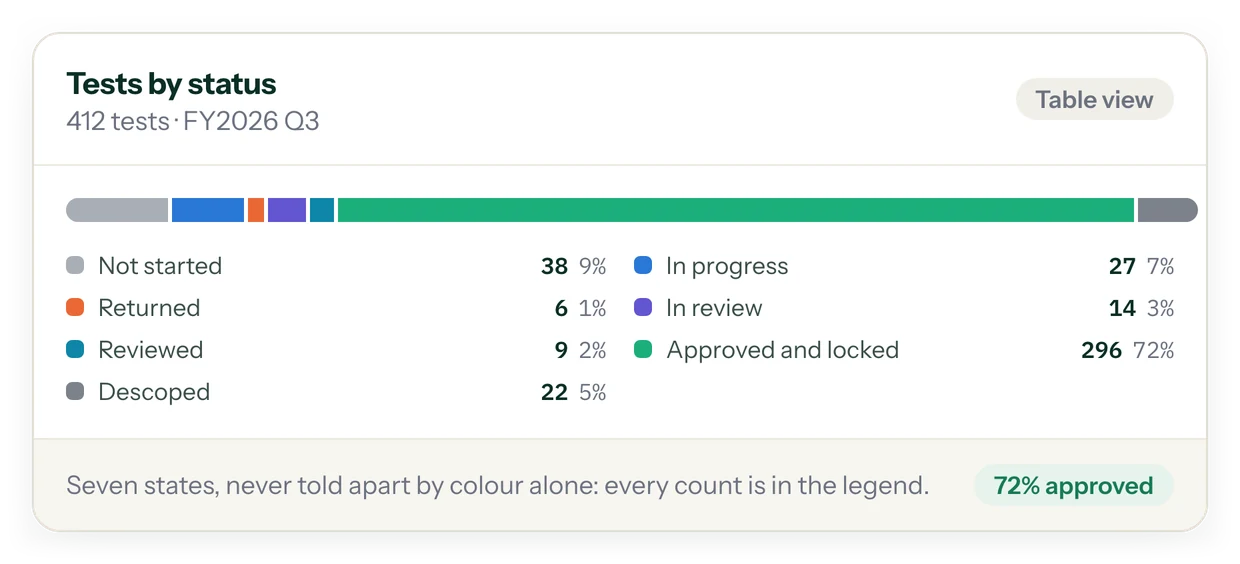
FAQ
Questions about the product
Can we run more than one legal entity?
Yes. Each legal entity keeps its own controls, processes, tests and deficiencies, and a cross-entity dashboard sits on top for the program as a whole.
Who decides what counts as a pass?
You do. Reusable, versioned templates define what "pass" means for a control, so the same definition applies every time that control is tested.
Does the AI make the final decision?
No. For each sample the AI proposes Pass, Fail, Insufficient or N/A with the exact quote and page it relied on. With auto-fill on, a result the AI is at least 90% sure of can be recorded while the test is being prepared, but until the test is submitted a person can accept, edit or override any result, auto-filled ones included. An override always carries a reason, and the preparer, reviewer and approver sign off the test.
What happens once a test is approved?
It locks. Any later change opens a new version and starts review again, so an approved result is never edited in place.
Can our client company see the work?
Yes, as read-only. Invite them with the viewer role, scoped per entity, and they never get write access.
Can we keep our own sample sizes, numbering and deadlines?
Yes. Your sample-size table by control frequency, numbering schemes for controls, tests and deficiencies, testing deadlines and deficiency thresholds all live in company settings.
Bring one control. Get the first pass back with a citation on every verdict.
Start a 14-day free trial with 5 AI sample tests. No card needed.